What Is an ICS File? Anatomy of the Calendar Format
An .ics file is the calendar file attached to a meeting invite, published as a school timetable, or sitting inside a Google Calendar export. This page is the map: what the format is, what the text actually looks like, how to open it without importing it, and when you would rather have a spreadsheet.
The short answer
An ICS file is a plain-text file written in the iCalendar format. The official name of the format is iCalendar. The usual file extension is .ics. People also say "iCal file," leftover from Apple's old iCal app. Those three names — ICS, iCal, iCalendar — are the same object. The current specification is RFC 5545. The MIME type on the wire is text/calendar.
Google Calendar, Apple Calendar and Microsoft Outlook all read and write this format. That is why it became the default way to move events between apps that otherwise do not talk to each other. A meeting you accept in Gmail, a holiday calendar you subscribe to, a shift roster your workplace emails as an attachment: they are almost always the same kind of file.
You will meet an ICS file in a few everyday shapes:
- A single meeting invitation attached to an email — often named
invite.ics— and often carryingMETHOD:REQUESTso the calendar app can show Accept / Decline. - A class timetable, conference agenda or public-holiday list published as a downloadable
.icsthat you import once or subscribe to. - A whole calendar export — every event on one Google, Outlook or Apple calendar, packed into a single file. Google's own export is a zip that contains one
.icsper calendar.
It is not a spreadsheet, not a PDF, and not a program. Open it in any text editor and you will see labeled lines: BEGIN:VCALENDAR, then one or more BEGIN:VEVENT blocks, then the matching END lines. That is the entire format: a nest of components, each made of property lines with a name, an optional parameter, a colon, and a value.
If you already know you want to write one from scratch — required fields, all-day dates, recurrence, escaping — that is a different job. Use how to create an ICS file. This page stays on the definition and the routing table: what you are looking at, how to open it, and which tool on this site matches the next step.
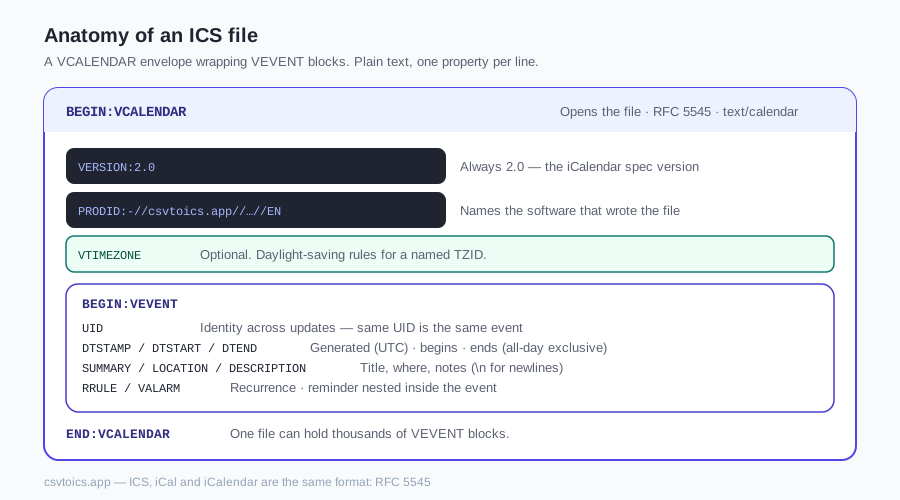
Anatomy of an ICS file
The file is a VCALENDAR envelope. Inside the envelope sit one or more VEVENT blocks (and, in more complete files, a VTIMEZONE block that defines daylight-saving rules). Inside each VEVENT sit property lines. Nothing is binary. Nothing is compressed. A ten-line file is a complete, legal calendar.
Here is a real, minimal example — one event, UTC times, nothing decorative:
BEGIN:VCALENDAR
VERSION:2.0
PRODID:-//csvtoics.app//ics-explained//EN
BEGIN:VEVENT
UID:pta-20260910@example.com
DTSTAMP:20260819T180000Z
DTSTART:20260910T230000Z
DTEND:20260911T000000Z
SUMMARY:Parent-teacher conference
END:VEVENT
END:VCALENDAR
That file is valid RFC 5545. The calendar itself has to declare VERSION:2.0 and a PRODID that names the software that wrote it. Each event has to carry a UID (a globally unique id so later updates can find the same event), a DTSTAMP (when this copy of the event was generated, always in UTC) and a DTSTART (when the event begins). DTEND and SUMMARY are optional in the spec, but an event without a title or an end time is rarely what anyone meant to send.
The properties you will actually care about, said in one sentence each:
| Property | In human |
|---|---|
| DTSTART | When the event begins. A date-time with a trailing Z is UTC; a TZID= parameter is a named local zone; VALUE=DATE is all-day. |
| DTEND | When it ends. For all-day events this date is exclusive — a one-day event on August 3 ends on August 4. |
| SUMMARY | The title you see on the calendar square. |
| LOCATION | Where it happens: a room, an address, a video-call URL. |
| DESCRIPTION | Notes, agenda, dial-in details. Newlines inside the value are written as \n. |
| RRULE | The recurrence rule, if this event repeats. FREQ=WEEKLY;BYDAY=MO is "every Monday." |
| UID | The event's identity across updates. Two events with the same UID are treated as the same event. |
| VALARM | A reminder nested inside the event — typically a pop-up or email a few minutes before DTSTART. |
A file can also carry VTODO (tasks), VJOURNAL (notes) and VFREEBUSY (availability). In the files people actually email and export, you almost never see those. VEVENT is the component that arrives as an invite or a calendar backup.
If you want to write one of these yourself — including the escaping, line-folding and exclusive-DTEND rules that break hand-typed files — go to how to create an ICS file. The example above is here so you can recognize the shape, not so you copy-paste a template.
How to open an ICS file
"Open" is the word that causes the trouble. Double-clicking an .ics file does not show you the text. On every major desktop and phone it imports the events into the default calendar app.
- Windows: Outlook, or the built-in Calendar app, swallows the file and adds the events.
- macOS: Calendar.app offers to add them to a calendar you pick.
- iPhone and iPad:tapping an attachment walks you toward adding it to Calendar. There is no built-in "just look."
- Android: the same, usually through Google Calendar.
That is convenient when you already trust the file. It is the wrong first move when you do not. An unexpected invite.ics can be one meeting or three hundred duplicated events, and reversing a calendar import is tedious on every platform.
Any text editor will show you the raw lines: Notepad, TextEdit (switch to Format → Make Plain Text first), VS Code, nano. That is enough to confirm "this is iCalendar text" and to read a title or two. It is a poor way to read a 400-event export, and a worse way to check whether the dates survived a timezone conversion.
If you want to see the events as a readable list without importing them, use the ICS viewer. It groups events by date, shows all-day and repeating badges, and never touches the calendar already on your device. The file is parsed in your browser; it is not uploaded.
If you want to change titles, dates, times or locations and then download a new .ics, use the ICS editor. That edits the file itself, not the calendar it came from and not the calendar it might go into. You only import the downloaded copy if you decide to.
ICS vs CSV — which one when
ICS is the language calendar apps speak to each other. CSV is the language spreadsheets speak. They hold overlapping facts — a title, a start, an end, a place — but they are built for different next steps.
Stay in ICS when the events still need to live in a calendar:
- you are sending a schedule to Google Calendar, Apple Calendar or Outlook
- you are publishing a timetable that people will import or subscribe to
- the events repeat, and the recurrence rule has to travel with them (CSV has no standard RRULE column)
Step into CSV when the events become data:
- you want to sort, filter, count or bulk-edit in Excel or Google Sheets
- you are cleaning a messy export before converting it back
- you are building a new calendar from a list you already keep as a table
Both directions exist here. The ICS to CSV converter turns a calendar file into a spreadsheet with one row per event. The CSV to ICS converter on the home page turns a table back into a calendar file. If the table is still an Excel workbook, use the Excel to ICS path instead of exporting to CSV first.
A practical rule: if the next person to touch the file is a calendar app, send ICS. If the next person to touch it is you, in a grid, send CSV.
Common ICS questions from real files
A few things that surprise people the first time they open a file from the wild:
- Google's export is a zip.Settings → Import & export → Export does not download a single
.ics. It downloads a zip, and inside that zip is one.icsper calendar. Unzip it, then open the file that matches the calendar you actually wanted. Some Outlook "export calendar" paths wrap the result the same way. - One file can hold thousands of events.There is no "one event per file" rule. A year of a busy work calendar is still one VCALENDAR with a long list of VEVENT blocks. The viewer and the editor on this site are built for that size; tens of thousands of events will make a page of cards sluggish, but a typical personal or team export is fine.
- METHOD:REQUEST vs METHOD:PUBLISH.
REQUESTmeans "this is an invitation — please accept or decline."PUBLISHmeans "here is a published schedule, not a request for a reply." Invitation attachments from Outlook and Gmail are usually REQUEST. Consumer calendar exports are usually PUBLISH, or they omit METHOD entirely. - The text is supposed to be UTF-8. Emoji in titles, accented names and CJK locations are all legal. If a file looks garbled in a text editor, the writer used a different encoding — the events will look garbled after import too. That is worth knowing before you add them to a calendar.
None of this requires you to write a file by hand. When you do need to produce one, convert a spreadsheet or follow the how-to.
ICS files — frequently asked questions
What opens an ICS file?
Any calendar app that speaks iCalendar: Google Calendar, Apple Calendar, Outlook, and most phone calendars. Double-clicking the file on a computer, or tapping an invite.ics attachment on a phone, usually imports the events into that default app. A text editor will open the same file as labeled lines, which is useful for a quick look but not for reading a large export.
Is ICS the same as iCal or iCalendar?
Yes — three names for one format. iCalendar is the official name in RFC 5545. .ics is the file extension. iCal is leftover from Apple's old calendar app and is still what a lot of people type into a search box. If a file starts with BEGIN:VCALENDAR, it is this format, whatever the name on the download.
How do I open an ICS file without importing it?
Use the ICS viewer on this site. Drop the file in and read every event grouped by date — times, locations, descriptions, repeating badges — without adding anything to Google, Apple or Outlook. The file is parsed in your browser and is never uploaded. A text editor also avoids an import, but it shows raw property lines rather than a readable agenda.
How do I create an ICS file?
Two honest paths. If the events already live in a spreadsheet, run the table through the CSV to ICS converter (or the Excel-specific path) and download the file. If you want to type a valid file by hand — required fields, all-day dates, recurrence, escaping — follow the how-to-create-an-ICS-file guide. For more than a couple of events, the converter is faster and less error-prone.
Can I edit an ICS file?
Yes. Because it is plain text you can edit it in any editor, but one missed comma-escape or a broken BEGIN/END pair will make the file fail to import. The ICS editor on this site opens the file as event cards — title, dates, times, location, description — and writes a new .ics you can download. It edits the file, not the calendar already on your device.
How do I get an ICS file into Excel?
Convert it first. ICS is not a spreadsheet, so Excel will not lay the events out as rows if you just open the .ics. Use the ICS to CSV converter to produce a CSV with one row per event, then open that CSV in Excel or Google Sheets. From there you can sort, filter, bulk-edit, and convert back if you need a calendar file again.
Are ICS files safe to open?
The file itself is plain text. It does not execute code, install software or run a macro. Reading one in a text editor or in the ICS viewer is the cautious option. The real risk is importing an unexpected invite (calendar spam that is tedious to delete) or following a link inside the DESCRIPTION. Check the contents before you add the events or click anything in the notes.
What apps use ICS files?
Every major calendar: Google Calendar, Apple Calendar (macOS, iPhone, iPad), Outlook and Outlook.com, and most Linux desktop calendars. Conference sites, school portals and ticketing systems publish schedules as .ics. Email clients attach invite.ics to meeting requests. If two calendar products need to exchange events, ICS is almost always the file they hand each other.
Keep reading
Recurring events + saved templates — a Repeat column (weekly, monthly, weekdays…) becomes a real RRULE in your .ics, and your column mapping is saved for one-click re-use. $7 one-time, no subscription — still 100% in your browser.