ICS to PDF — Print Any Calendar File
School and club schedules, shift rosters, conference programmes, a client's booking list, a paper backup of the term ahead — those are the calendars people actually print. Converter sites that “turn ICS into PDF” do it by uploading the whole schedule to a server you do not control. This page does not. Drop the .ics here, pick an agenda or a month grid, and use your browser's Print → Save as PDF. The file never leaves the device.
Agenda or month grid
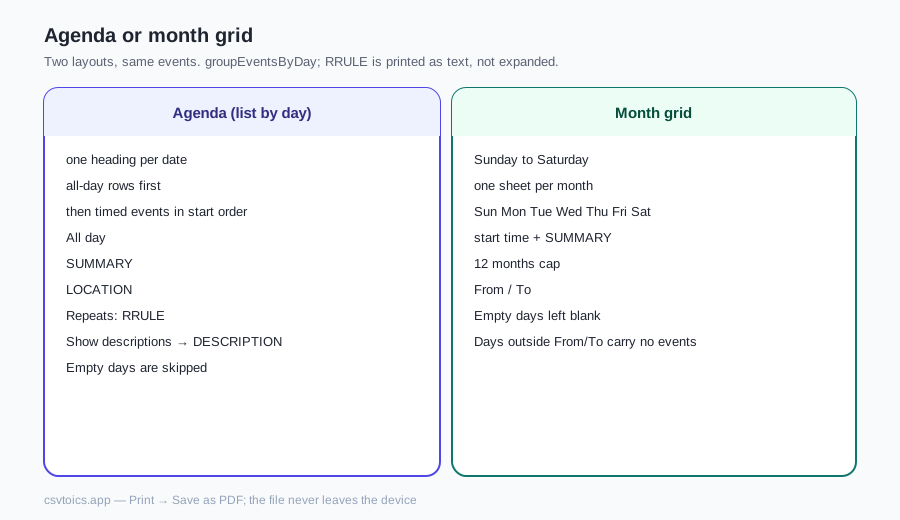
Two layouts, same events. Agenda (list by day) is a running diary: one heading per date, all-day rows first, then timed events in start order. Each row shows the clock time (or “All day”), the title, the location, and the raw recurrence rule when the VEVENT has one. Tick Show descriptions for notes — a conference abstract, a shift instruction — and leave it off for a tighter page. Use the agenda when you need to read the day in sequence: a roster, a programme, a week of lessons.
Month gridis a seven-column calendar, Sunday to Saturday, one sheet per month in the selected range. Each cell lists that day's titles (with a start time for timed events). Use it when the question is “what does this month look like?”, not “what happens at 14:00 on Tuesday”. The grid is simple CSS — not a typeset wall calendar — and it stops at 12 months, with a notice if your range is longer. Days outside From/To stay on the month sheet so it still looks like a month, but they carry no events. Empty days are skipped in the agenda and left blank in the grid; neither layout invents events.
| Layout | What it shows | Empty days |
|---|---|---|
| Agenda (list by day) | One heading per date; All day or clock time; title (SUMMARY); location; Repeats: RRULE; Show descriptions adds DESCRIPTION. | Skipped |
| Month grid | Sunday to Saturday, one sheet per month; start time + SUMMARY in each cell; From / To; cap 12 months. | Left blank; days outside From/To stay on the sheet but carry no events |
How the PDF is made
There is no PDF library on this page and no file is generated on a server. The printable region is an HTML sheet. The button calls window.print()— the same print command every browser already has. In the dialog, set the destination to Save as PDF (Chrome and Edge), PDF (Safari, under the PDF dropdown), or Save to PDF/ “Print to file” (Firefox). The browser's print engine paginates the sheet; the file in your downloads folder is a PDF the OS wrote, not one we assembled.
Paper size and margins are chosen in that dialog, not here. A4 and Letter both fit; portrait matches an agenda. Site chrome is hidden for print — only the sheet, with the calendar name and the date range at the top, should appear. Turn off “headers and footers” in the dialog if the URL still prints, and use the button on this page rather than the system Print menu on the whole window. The PDF will look like this page's type, not a Google Calendar or Outlook memo. That is the trade for keeping the schedule on the device.
Timezones and all-day events
Timed events are converted into the timezone you pick (it defaults to the browser's zone, with the same IANA list the other tools on this site use). A DTSTART stored as UTC (the value ends in Z) is shown as wall-clock time in that zone, so a 23:00Z meeting can land on the next calendar day in Tokyo. Events that already carry a TZID, and floating times with no Z and no TZID, keep the wall-clock digits they were written with — the same rule resolveICSDate uses elsewhere on this site.
All-day events are dates, not moments: a VALUE=DATE is listed on that calendar day in every timezone, and it is listed first in the agenda, before any timed row. Multi-day all-day events follow the iCalendar convention that DTEND is exclusive — a conference written 5–8 September appears on the 5th, 6th and 7th, not the 8th, capped at 366 days so a broken end date cannot paint a thousand pages. A timed event that crosses midnight is printed on its start day only; only all-day spans are repeated across days.
Recurring events
This printer does not expand recurrence. The shared parser in lib/ics.js reads RRULE onto the event as a string and stops there. There is no iterator, no COUNT/UNTIL walk, and no EXDATE handling — lib/recurrence.js only writes rules for the Pro generator, it does not unfold a series for display. So a “weekly on Monday” VEVENT is printed once, on the DTSTART date, with the rule text on the row (for example FREQ=WEEKLY;BYDAY=MO). You will not get 52 Monday rows from one rule.
If the paper copy has to show every occurrence, expand the series in Google Calendar, Outlook or Apple Calendar and export that date range, or copy the event in the ICS editor once per date. Printing the rule text is honest; claiming expansion we did not implement would not be.
Getting the .ics
You need an iCalendar file, not a screenshot. The usual exports:
- Google Calendar:Settings → Import & export → Export. The download is a zip with one .ics per calendar; unzip it and drop the calendar you want. A single calendar also has an “Export” / “Integrate calendar” secret address, but the zip is the straightforward path.
- Outlook:File → Save Calendar (classic desktop) or the calendar's share/export menu on Outlook.com. Save as .ics, not as a .pst or a CSV.
- Apple Calendar: File → Export → Export… (a whole calendar) or File → Export → Calendar Archive if you want a backup; for this printer you want the .ics, not the .icbu archive.
Want to read the file on screen first, or take the events into a spreadsheet instead of onto paper? Use the ICS viewer, the ICS to CSV converter, or the ICS to Excel converter— same parser, still in the browser.
ICS to PDF — frequently asked questions
Is my calendar uploaded when I print it as a PDF?
No. The .ics file is read and parsed in your browser. There is no upload endpoint and no PDF is built on a server. Print / Save as PDF opens your browser's own print dialog; the file never leaves the device. You can load this page, go offline, and still print.
Are recurring events expanded into every occurrence?
No. lib/ics.js stores each VEVENT once and keeps the RRULE as text — there is no recurrence expander in this codebase. A weekly standup is printed once, on its DTSTART day, with the rule (for example FREQ=WEEKLY;BYDAY=MO) shown on the row. EXDATE, RDATE and RECURRENCE-ID are not applied. If you need every occurrence on the page, expand the series in your calendar app and export that range, or duplicate the rows in the ICS editor first.
How do I choose paper size — A4 or Letter?
In the print dialog. This page does not lock a paper size. Chrome, Safari and Firefox let you pick A4, Letter or whatever your printer offers, plus portrait or landscape and the margins. The on-screen preview is laid out to fit either A4 or Letter; the dialog is what actually sizes the PDF.
Can I change colours and fonts in the PDF?
Only through the browser print dialog. Background colours print if you enable “Background graphics” (Chrome) or “Print backgrounds” (Safari/Firefox); leave that off for a plain black-on-white agenda. Fonts are your browser's UI font at print size — there is no theme picker and no CSS you can edit from this page. For a designed programme, export CSV and lay it out in a word processor.
How many events can I print?
The file picker accepts one .ics up to 10 MB. A typical school-term or conference file is well under that. Very large exports (thousands of events) will parse, but the print preview and the browser's print engine will be slow, and a month grid longer than 12 months is capped with a notice. Narrow the date range, or split the export, if the tab struggles.
Can I print only part of the date range?
Yes. After the file loads, From and To default to the first and last day in the file. Change them to a week, a month or a term; the agenda and the month grid both hide days outside that window. Multi-day all-day events still appear on each day they cover that also falls inside the range.
Can I edit the events before printing?
Not on this page — the printer only reads. Open the file in the ICS editor (/ics-editor) to change titles, times or descriptions, download the corrected .ics, then drop that file here. The editor also runs in the browser and does not upload your calendar.