JSON to ICS Converter — From API Export to Calendar File
Turn a JSON array of events into a .ics calendar file right here in the browser. Built for developers and no-code users who already have events as JSON — from an API, a CMS export, a scraper, an Airtable or Notion dump, a script — and need them in Google Calendar, Outlook or Apple Calendar. No upload, no server, no copy of your schedule sitting somewhere else.
What JSON shape works
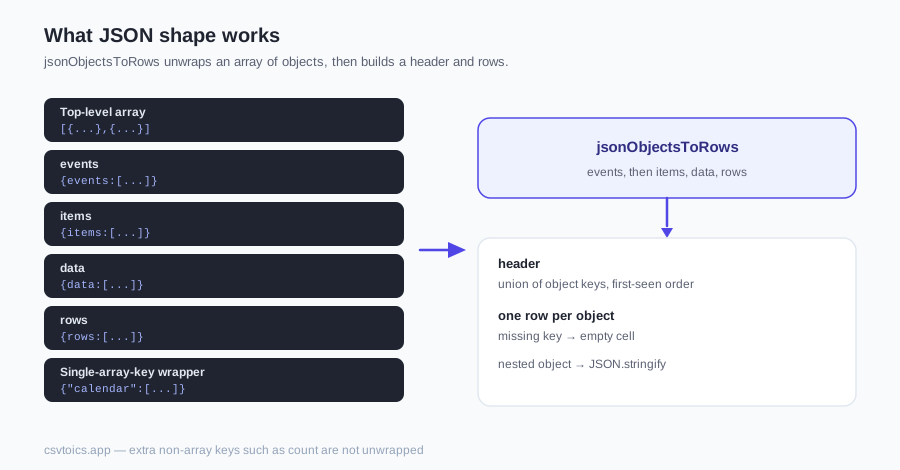
The converter looks for an array of objects. A top-level array is the simplest shape — drop this as events.json and each object becomes one event:
[
  {
    "title": "Team standup",
    "start": "2026-09-05T09:00:00Z",
    "end": "2026-09-05T09:15:00Z",
    "location": "Zoom",
    "description": "Daily 15-minute sync"
  },
  {
    "title": "Design review",
    "start": "2026-09-05T14:00:00Z",
    "end": "2026-09-05T15:00:00Z",
    "location": "Room 4B",
    "description": "Sprint 12 mockups"
  },
  {
    "title": "Office closed",
    "start": "2026-09-07",
    "end": "2026-09-08",
    "location": "",
    "description": "Public holiday — all-day"
  }
]
A wrapper object is fine too. The converter checks keys in this order: events, then items, data, rows — {"events":[...]} is the usual API shape. If none of those match, an object whose only key holds an array — {"calendar":[...]} — is used. An object with extra non-array keys such as count will not be unwrapped. Keys across every object are unioned into a header row in first-seen order, so a later event that adds location still maps correctly; earlier events just get an empty cell for that key.
Nested objects and arrays are not flattened. They are JSON.stringify'd into one cell. That keeps the file honest — you can see the blob in the mapper — but a nested date is not a date the parser can read. Flatten before converting, or pick a different export.
| Shape | Example | Result |
|---|---|---|
| Top-level array | [{...},{...}] | Each object becomes one row. |
| Named wrappers | events, then items, data, rows | First matching key's array is used. |
| Single-array-key wrapper | {"calendar":[...]} | Unwrapped when that is the only key. |
| Extra non-array keys | count plus a one-off array key | Not unwrapped — none of the named keys matched, and keys.length is not 1. |
Dates in JSON: ISO 8601 is the one that never breaks
Write datetimes as ISO 8601. 2026-09-05T14:00:00Z and 2026-09-05T14:00:00+01:00 are converted into the calendar timezone you pick in the options. A naive 2026-09-05T14:00 — no Z, no offset — is read as wall-clock time in that timezone. A date-only value like 2026-09-05 has no time, so with “Treat rows without a start time as all-day events” checked (the default) it becomes an all-day event. Those three forms are what the preview will parse cleanly.
Unix timestamps are not auto-detected. A number like 1757080800 lands in the cell as digits; the date parser does not treat it as seconds-since-epoch. Convert in your script first — new Date(ms).toISOString() in JavaScript, or the equivalent in Python — then drop the file here. Same rule for millisecond timestamps and for locale strings like “Sept 5, 2026 2pm”: they might parse, they might not. ISO never argues.
Mapping keys to calendar fields
After the file loads, the converter shows the same column mapper used for CSV and Excel. JSON keys appear as columns — title, start, end, location, and whatever else your objects contain. Auto-detect picks likely matches (Subject / Title, Start Date, Location); you fix anything it misses with the dropdowns. Only a start date is required; a row without a title becomes (untitled event).
If your API uses headline instead of title, or begins_at instead of start, pick those columns from the dropdowns — auto-detect will not. The preview shows the first five events; click “Show all N events” to see the rest, which is where a wrong key or a nested date shows itself. Nothing is written until you click Download.
Where JSON events usually come from
The common case is an API: GET /events returns an array, or a body with an events (or data) key. Save that response as .json and drop it in. Scraped listings — conference programmes, cinema times, sports fixtures — end up in the same shape once a script has walked the page.
Notion and Airtable both export CSV and JSON. CSV is already a first-class input on this site; JSON is now the same converter, so pick whichever export your base actually gives you. A CMS dump of upcoming posts or events is the same idea: an array of records with a title and a date.
Google Calendar API responses are the awkward one. The event list lives in items[], which this converter will find — but each item's start is nested as start.dateTime (or start.date for all-day). That nested object is stringified into one cell, so the mapper cannot treat it as a start date. Flatten in your script so start.dateTime is a top-level string, or export the calendar as CSV instead and use the CSV to ICS converter.
Going the other way
To get events back out of a calendar file, use the ICS to CSV tool. That gives you a spreadsheet. CSV to JSON is then trivial — JSON.stringify on the parsed rows, or any spreadsheet “save as JSON” export. There is no ICS-to-JSON button on this site because CSV is the useful stop in the middle: you can open it, fix dates, and convert either direction from there.
JSON to ICS — FAQ
What JSON shape does this converter accept?
A top-level array of objects — [{...},{...}] — or an object that wraps that array under events, then items, data, rows, checked in that order. If none of those keys match, an object whose only key holds an array is unwrapped (for example {"calendar":[...]}). An object with extra non-array keys such as count will not be unwrapped. Each object becomes one event. Object keys become column headers in first-seen order; a missing key on a later object is an empty cell.
What happens to nested objects and arrays?
They are JSON.stringified into a single cell, not flattened. A Google Calendar API start object becomes the string {"dateTime":"..."} in a column named start — which the date parser cannot read. Flatten first so start.dateTime is its own key, or export as CSV instead.
Are Unix timestamps detected automatically?
No. A number like 1757080800 is treated as a string of digits, not a date. Convert timestamps to ISO 8601 first — 2026-09-05T14:00:00Z, or 2026-09-05 for an all-day event — then drop the file here.
Is my JSON uploaded to a server?
No. The file is parsed with JavaScript on your own device — there is no upload endpoint at all. You can load this page, go offline, and still convert. The .ics file is assembled and saved locally too.
How large a JSON file can I convert?
A JSON file can be up to 10 MB and 50,000 rows — the same limits as CSV and Excel. Those caps keep a huge API dump or a malformed file from freezing the tab. Split a larger export, or convert in batches.
Can JSON objects become recurring events?
Not from the JSON alone — each object becomes one single event, because a key like "weekly" isn't a recurrence rule. For repeating events, generate the .ics here and add RRULE lines afterwards; our guide to creating ICS files by hand shows the exact syntax.
Can I convert an ICS file back to JSON?
Use the ICS to CSV tool first — that gives you a spreadsheet of events. Turning those rows into JSON is then a one-liner in any language (JSON.stringify on the parsed CSV). There is no ICS-to-JSON button because CSV is the useful interchange format in between.