ICS to Excel Converter — Every Event as a Spreadsheet Row
Turn any iCalendar (.ics) export into a real Excel workbook. Drop the file below, preview the first eight events in a table, pick a timezone for UTC times, and download an .xlsx — or flip the toggle to CSV or JSON. 100% in your browser — nothing is uploaded.
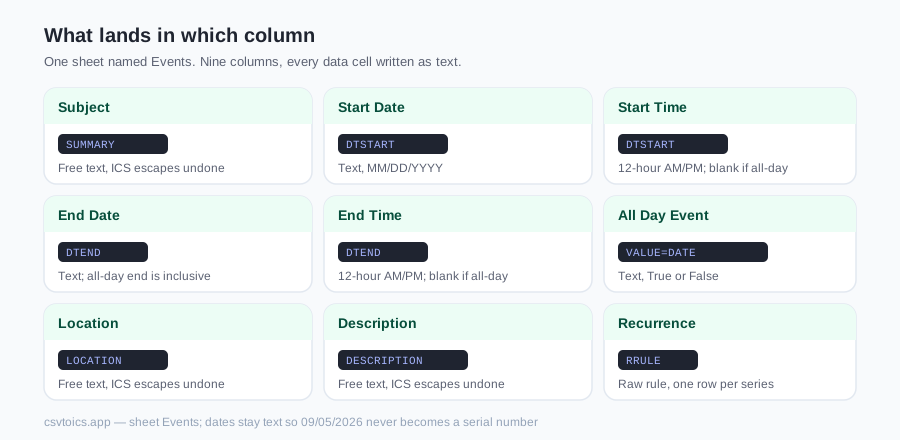
What lands in which column
The workbook has a single sheet named Events: one header row, then one row per event. The nine columns are the same headers the CSV download uses, in the same order — eight of them are the header names Google Calendar's CSV import recognises (Recurrence is this site's extra column), which is why the sheet can go back into a calendar later.
| Column | Comes from | Cell content |
|---|---|---|
| Subject | SUMMARY | Free text, ICS escapes undone |
| Start Date | DTSTART | Text, MM/DD/YYYY |
| Start Time | DTSTART | Text, 12-hour with AM/PM; blank for all-day |
| End Date | DTEND | Text, MM/DD/YYYY; for all-day events the exclusive ICS end becomes the inclusive last day |
| End Time | DTEND | Text, 12-hour with AM/PM; blank for all-day |
| All Day Event | DTSTART date-only (VALUE=DATE or 8-digit) | Text, True or False |
| Location | LOCATION | Free text, ICS escapes undone |
| Description | DESCRIPTION | Free text, ICS escapes undone |
| Recurrence | RRULE | Raw rule, e.g. FREQ=WEEKLY;BYDAY=MO |
Column widths are the header length plus two characters, with a floor of 12, so the header row is readable the moment the file opens. Nothing else is styled — no bold, no fills, no frozen panes. The parser also reads UID, STATUS and ORGANIZER from each VEVENT, but those do not get a column; the sheet is limited to the nine fields above. Events with no DTEND are kept, and an all-day DTEND (which ICS stores as the day after the event) is converted back to the inclusive end date you would expect in a spreadsheet.
Dates are kept as text on purpose
Every data cell in the workbook is written as a text cell — SheetJS cell type s — including Start Date, End Date, Start Time and End Time. Start Date holds the literal string 09/05/2026, Start Time the literal string 2:00 PM. No value is converted into an Excel serial date number.
Three reasons. A serial date is displayed according to the locale of whoever opens the file, so 03/04/2026 can read as March 4 on one machine and April 3 on another; a text cell says the same thing everywhere. The .xlsx shows exactly the same values as the CSV download, so switching between CSV and Excel never changes the values (JSON keeps the same strings too, except allDayEvent, which becomes a boolean). And the conversion is reversible: on a US-locale Excel, DATEVALUE and TIMEVALUE turn the text into real dates when you need arithmetic; on a day-first locale build the date from the MM/DD/YYYY parts with DATE, LEFT and MID instead, because DATEVALUE follows the machine locale.
The trade-off is sorting. Sorting the Start Date column sorts the MM/DD/YYYY strings alphabetically, which is month-first, not chronological across years — convert to real dates first if you need a true date sort.
The exporter also forces text for any column whose header contains id, uid, phone or tel, so leading zeros survive. None of the nine default headers match that rule; the test file scripts/test-ics-export.mjs checks it with a synthetic UID column, writing a workbook and reading it back with the same library to assert that 12345 and 0042 come back as strings and that the Start Date cell is type s with value 09/05/2026.
Recurring events: one row, rule kept
When a VEVENT carries an RRULE line, the parser stores its value untouched and the exporter writes it into the Recurrence column — for example FREQ=WEEKLY;BYDAY=FR. The event is written once. The tool does not expand the rule into one row per occurrence, so a weekly meeting is one row in the sheet, not 52.
The parser ignores EXDATE, RDATE and RECURRENCE-ID lines, along with VALARM reminder blocks and vendor X- properties. That means a cancelled occurrence is not removed from the series row, and a moved occurrence that the calendar exported as its own VEVENT with RECURRENCE-ID shows up as an extra, unlinked row — the series row itself is as originally defined. If you need one row per date, expand the series in your calendar app before exporting, or build the dates in the spreadsheet from the rule.
Getting the .ics file out of your calendar first
Most people arrive here without an .ics file yet — the calendar lives in an app. These are the export paths for the three big ones.
| Calendar | How to get an .ics out |
|---|---|
| Google Calendar (web) | Settings → Import & export → Export. You get a ZIP with one .ics per calendar — unzip it first, then drop the calendar you want. |
| Outlook for Windows | File → Save Calendar. This writes an .ics directly; the More Options button in that dialog lets you pick the date range and level of detail. |
| Apple Calendar (macOS) | Select the calendar in the sidebar, then File → Export → Export. |
Going back to a calendar file
Because the headers are the ones Google Calendar's CSV import expects — Subject, Start Date, Start Time, End Date, End Time, All Day Event, Location, Description — a sheet you edit can be turned back into an .ics. The Excel to ICS converter reads the .xlsx directly, and the CSV to ICS converter takes the CSV; both detect those headers automatically, so you do not rename anything. Bulk-edit titles or locations in the spreadsheet, convert back, import — that is the round trip this page is built for.
CSV or JSON instead
The three buttons beside Download switch the output. CSV is UTF-8 with a byte-order mark, the same nine headers, and opens by double-click in Excel with accented characters intact. JSON is an array with one object per event; the keys are the headers in camelCase — subject, startDate, startTime, endDate, endTime, allDayEvent, location, description, recurrence. allDayEvent is a boolean true or false; every other value is a string, with an empty string for a field the event did not have. The file is indented with two spaces.
The download is named after your input: meetings.ics becomes meetings.xlsx, meetings.csv or meetings.json, and pasted text becomes pasted.xlsx.
ICS to Excel — frequently asked questions
How do I convert an ICS file to Excel?
Drop your .ics file into the converter on this page, or paste the raw ICS text. The Excel (.xlsx) format is already selected here, so once the preview table appears you click Download .xlsx. You get a workbook with one sheet named Events and nine columns: Subject, Start Date, Start Time, End Date, End Time, All Day Event, Location, Description and Recurrence. The file picker accepts .ics, .ical, .icalendar and .ifb files, and nothing is uploaded.
Does the .xlsx keep dates as real Excel dates?
No, and that is deliberate. Every data cell is written as a text cell: Start Date holds the string 09/05/2026 and Start Time holds the string 2:00 PM, exactly as the CSV download would. Excel therefore shows the same values on every machine regardless of locale. If you need date arithmetic, convert the text with DATEVALUE or TIMEVALUE on a US-locale Excel, or build the date from its MM/DD/YYYY parts with DATE on a day-first locale.
What happens to recurring events?
A recurring event is written once, with its raw RRULE (for example FREQ=WEEKLY;BYDAY=FR) in the Recurrence column. The converter does not expand the rule into one row per occurrence, and it ignores EXDATE, RDATE and RECURRENCE-ID lines, so a cancelled occurrence is not removed from the series row, and a moved occurrence exported as its own VEVENT appears as an extra, unlinked row.
Can I get CSV or JSON instead of .xlsx?
Yes. The three buttons next to the Download button switch the output between CSV, Excel (.xlsx) and JSON. The CSV is UTF-8 with a byte-order mark. The JSON is an array with one object per event, keyed by the column headers in camelCase, with allDayEvent as a true/false boolean and two-space indentation.
How do I export my calendar to an .ics file first?
Google Calendar on the web: Settings → Import & export → Export, which downloads a ZIP with one .ics per calendar — unzip it first. Outlook for Windows: File → Save Calendar, which writes an .ics directly. Apple Calendar on macOS: select the calendar in the sidebar, then File → Export → Export.
Is my calendar uploaded anywhere?
No. The ICS is parsed in your browser and the workbook is built there too. The spreadsheet-writing library is fetched from this site the first time you click Download .xlsx, but your calendar data never leaves your device.
How are timezones handled?
Events stored with a named timezone (TZID) keep their original wall-clock time. Events stored as UTC (times ending in Z) are converted to the display timezone you pick above the preview — it defaults to your browser's zone. All-day events have no time at all and get True in the All Day Event column.