ICS to JSON Converter — From .ics to a Clean Event Array
Drop an .ics file below — or paste the raw text — then preview the first eight events in a table, pick a timezone for UTC times, and download a JSON array with one object per VEVENT. The nine camelCase keys match the CSV columns, so the same data can go back through the JSON to ICS converter — eight fields map automatically, recurrence only with the Pro Repeat column, as explained below. 100% in your browser — nothing is uploaded.
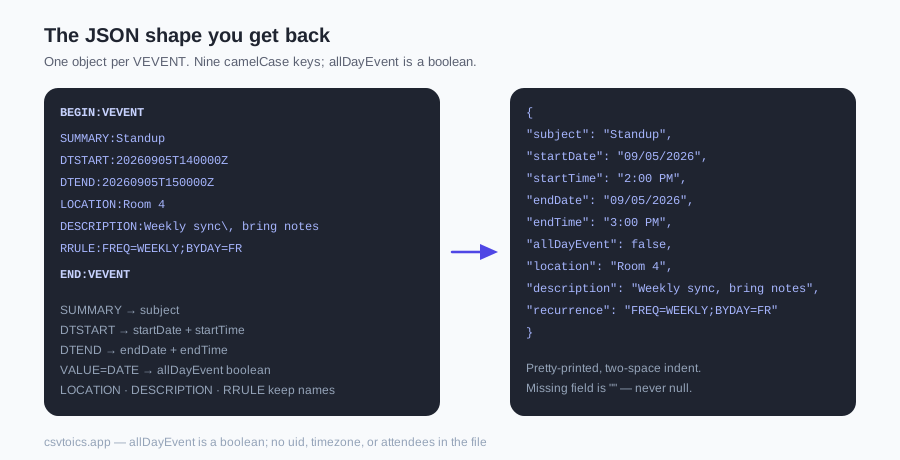
The JSON shape you get back
The download is a top-level JSON array: one object per VEVENT, in the order those events appear in the file, pretty-printed with two-space indentation via JSON.stringify(objects, null, 2). That call is exactly what buildJsonText runs after it has turned the preview table into objects.
Keys are the nine column headers run through camelCaseHeader: subject, startDate, startTime, endDate, endTime, allDayEvent, location, description, recurrence — in that order on every object. The helper splits a header on non-alphanumeric characters, lowercases the first part and capitalises the rest, so All Day Event becomes allDayEvent.
Every value is a string except allDayEvent, which is a real boolean (true or false), not the True / False strings the CSV writes. The row builder emits those strings; the JSON step converts them with String(v).toLowerCase() === "true". A field the event did not have is an empty string "", never null and never omitted, so every object has the same nine keys.
Here is the real output of the code for two VEVENTs — a UTC 14:00–15:00 meeting with an RRULE, and a date-only event — with the display timezone set to UTC:
[
  {
    "subject": "Standup",
    "startDate": "09/05/2026",
    "startTime": "2:00 PM",
    "endDate": "09/05/2026",
    "endTime": "3:00 PM",
    "allDayEvent": false,
    "location": "Room 4",
    "description": "Weekly sync, bring notes",
    "recurrence": "FREQ=WEEKLY;BYDAY=FR"
  },
  {
    "subject": "Offsite",
    "startDate": "09/10/2026",
    "startTime": "",
    "endDate": "09/10/2026",
    "endTime": "",
    "allDayEvent": true,
    "location": "",
    "description": "",
    "recurrence": ""
  }
]
That array is what buildJsonText emits for this ICS. The first VEVENT was DTSTART:20260905T140000Z / DTEND:20260905T150000Z / LOCATION:Room 4 / DESCRIPTION:Weekly sync\, bring notes / RRULE:FREQ=WEEKLY;BYDAY=FR. The second was DTSTART;VALUE=DATE:20260910 / DTEND;VALUE=DATE:20260911. The escaped \, came back as a plain comma (unescapeText) and the exclusive all-day DTEND 20260911 became the inclusive endDate 09/10/2026.
What is not in the output — developers will ask, so this is explicit: there is no uid, no timezone key, no attendees, no organizer, no status, no ISO 8601 timestamp. The parser reads UID, STATUS, ORGANIZER and DURATION from each VEVENT but the row builder drops them; ATTENDEE lines are not parsed at all. The JSON is the same nine fields as the CSV download, nothing more.
| Key | Comes from | Value |
|---|---|---|
| subject | SUMMARY | string, ICS escapes undone |
| startDate | DTSTART | string, MM/DD/YYYY |
| startTime | DTSTART | string, 12-hour with AM/PM, "" for all-day |
| endDate | DTEND | string, MM/DD/YYYY; for all-day events the exclusive ICS end becomes the inclusive last day |
| endTime | DTEND | string, 12-hour with AM/PM, "" for all-day |
| allDayEvent | DTSTART date-only (VALUE=DATE or 8-digit) | boolean true or false |
| location | LOCATION | string |
| description | DESCRIPTION | string |
| recurrence | RRULE | string, raw rule or "" |
Dates and timezones in the output
Dates are strings in MM/DD/YYYY, zero-padded month and day; times are strings like 2:00 PM (12-hour, minutes zero-padded, seconds dropped). fmtDateUS writes the date; fmtTime12 writes the time from hours and minutes only, so a DTSTART of 20260905T140000Z becomes 09/05/2026 and 2:00 PM under UTC. There is no ISO timestamp and no epoch — if you need one, build it from startDate + startTime in your own code (e.g. new Date(`${startDate} ${startTime}`) in JS). The result is local-time to wherever that code runs.
Timezone rule, from resolveICSDate: a time stored as UTC (the value ends in Z) is converted to the display timezone chosen in the dropdown above the preview. That dropdown defaults to the browser's zone via Intl.DateTimeFormat().resolvedOptions().timeZone; a UTC option is available. A time with a TZID parameter keeps its original wall-clock digits and is not converted. A floating time (no Z, no TZID) is also left as written. The chosen timezone is not written into the JSON — the file has no way to say which zone its times are in, so record it yourself if it matters.
All-day events: allDayEvent true, startTime and endTime "", endDate is the inclusive last day (ICS stores the exclusive day after; the row builder subtracts one day). An event with no DTEND gets endDate equal to startDate and endTime "". A DURATION line is read onto the parsed event but is not used to compute an end.
Recurring events: one object, rule kept as a string
A VEVENT with an RRULE becomes one object; recurrence holds the raw rule text exactly as it appeared (e.g. FREQ=WEEKLY;BYDAY=FR). The parser stores cur.rrule = value untouched; the row builder copies ev.rrule || "". The rule is not expanded into one object per occurrence and it is not parsed into a nested object. A weekly standup is one object in the array, not fifty-two.
EXDATE, RDATE and RECURRENCE-ID lines are ignored by the parser — they fall through the default branch and are not stored — so a cancelled occurrence is not removed from the series object, and a moved occurrence that the calendar exported as its own VEVENT with RECURRENCE-ID becomes an extra, unlinked object. The series object itself is as originally defined. VALARM blocks sit at a nested depth inside the VEVENT and are skipped; vendor X- properties also hit the default branch and are dropped.
If you need instances, expand the rule in your own code. The rule string is the standard RFC 5545 RRULE value, so any RRULE library can take it as-is. Or expand the series in the calendar app before exporting the .ics, then drop that file here.
Why this runs in your browser, not on a server
A dropped file is read with FileReader; pasted text is trimmed and parsed the same way. Either way parseICS walks the VEVENT blocks and buildJsonText turns the table into JSON, all inside the page. The download is a Blob of type application/json;charset=utf-8 handed to an <a download> link via URL.createObjectURL. No request carries your calendar to a server — there is no upload endpoint for this tool. A calendar file lists who you meet, where and when; keeping it on your machine is the point.
Practical consequences: it works offline once the page has loaded; file size is bounded by your browser's memory, not a server limit; there is no API. If you need this in a pipeline, the nine-key shape above is exactly what the exporter writes and is stable enough to code against. The download is named after the input: meetings.ics becomes meetings.json, pasted text becomes pasted.json, and a file with no name becomes calendar.json.
The calendar data never leaves the device. No request carries it anywhere; the only extra resource the converter itself loads is the spreadsheet library, and only when you pick Excel (.xlsx) — never for JSON.
Going the other way: JSON to ICS
The JSON to ICS converter accepts a top-level array of objects (or an object wrapping the array under events / items / data / rows). Its header auto-detect recognises the keys this page writes — subject, startDate, startTime, endDate, endTime, allDayEvent, location and description all map automatically (verified against detectColumns in lib/ics.js). recurrence is not one of the fields detectColumns maps: on the free path a rule in that key is dropped (the converter only points out that the column is there), while with the Pro unlock its Repeat-column detection recognises a recurrence key and writes a FREQ=… value in it back as an RRULE. Export here, edit the array in a script, feed it back there.
The same converter on this page also offers CSV and Excel (.xlsx) via the three format buttons next to Download — see the ICS to CSV converter and the ICS to Excel converter if you want those formats as the default.
ICS to JSON — frequently asked questions
How do I convert an ICS file to JSON?
Drop your .ics file into the converter on this page, or paste the raw ICS text. JSON is already the selected format here, so once the preview table appears you click Download .json. You get one object per event with nine keys. The file picker accepts .ics, .ical, .icalendar and .ifb files, and nothing is uploaded.
What does the JSON look like?
A top-level array of objects. Each object has the keys subject, startDate, startTime, endDate, endTime, allDayEvent, location, description and recurrence, in that order. All values are strings except allDayEvent, which is a boolean true or false. A missing field is an empty string "", never null and never omitted. The file is pretty-printed with two-space indentation.
Are the dates ISO 8601 timestamps?
No. Dates are MM/DD/YYYY strings and times are 12-hour AM/PM strings, the same values the CSV download writes. There is no timezone key in the file. If you need a Date object, build one in your own code from startDate and startTime.
How are timezones handled?
Times stored as UTC (ending in Z) are converted to the display timezone you pick above the preview — it defaults to your browser's zone. Times with a TZID parameter, and floating times with no Z and no TZID, keep their original wall-clock digits. All-day events have empty-string times and allDayEvent true.
What happens to recurring events?
A recurring event becomes one object, with the raw RRULE (for example FREQ=WEEKLY;BYDAY=FR) in the recurrence field. The converter does not expand the rule into one object per occurrence. EXDATE, RDATE and RECURRENCE-ID lines are ignored, so a cancelled occurrence is not removed from the series object, and a moved occurrence exported as its own VEVENT becomes an extra, unlinked object.
Does the JSON include attendees, UID or organizer?
No. The JSON has only the nine fields listed above. The parser reads UID, STATUS, ORGANIZER and DURATION from each VEVENT, but the row builder does not export them. ATTENDEE lines are not parsed at all.
Is my calendar uploaded anywhere?
No. The ICS is parsed and serialised in your browser, and the download is a Blob handed to an anchor with the download attribute. No request carries your calendar data; the only extra resource the converter itself loads is the spreadsheet library, and only when you pick Excel (.xlsx) — never for JSON.