Outlook Calendar to ICS — Every Way to Get the .ics Out of Outlook
Outlook will give you an .ics file. It will not always give you the file you thought you asked for. As of 2026 — labels move between versions — there are three real exits: File → Save Calendar on classic Outlook for Windows (a whole calendar or a date range), File → Save As on one appointment, and Publish a calendar on new Outlook and Outlook.com (a live ICS URL). The Import/Export wizard is not one of those exits. This page is the map, then what to do with the file once you have it.
The other direction — getting a spreadsheet into Outlook — is a different job: CSV to Outlook Calendar. Do not mix the two menus. Import and export share a File tab; they are not the same action.
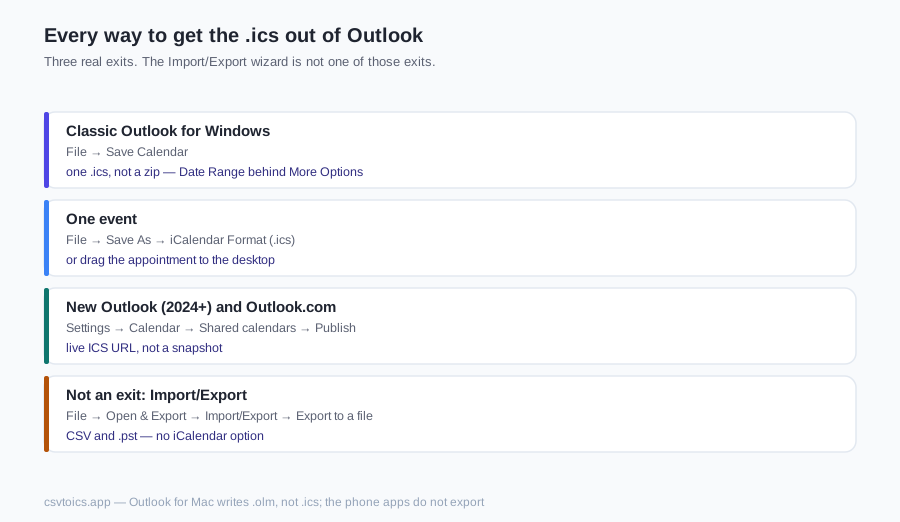
Classic Outlook for Windows: File → Save Calendar
As of 2026 — labels move between versions: in classic Outlook for Windows, switch to Calendar, select the calendar in the folder pane, then File → Save Calendar. The dialog writes iCalendar Format — one .ics, not a zip. The useful controls hide behind More Options.
Date Range: Whole calendar, or pick a start and end. Whole calendar is every appointment still on that folder, including years of history. A range is how you keep a ten-year mailbox from becoming a ten-megabyte file.
Detail level is what actually lands in the file. Availability only writes free/busy blocks — no titles, no locations, no bodies. Limited details adds subjects and times (and usually location); descriptions stay out. Full details writes subjects, locations, bodies and the rest of the appointment.
Include details of items marked private: leave it off and private appointments go out as Private or busy, without the real subject. Turn it on and those details sit in a plain-text file. Private in Outlook is a sharing flag, not encryption — whoever has the .ics can read it.
Include attachments: files stuck on appointments become ATTACH lines. That is the usual reason a Save Calendar file is huge. Leave it off unless you need those files in the calendar, not next to it.
Why Import/Export gives you CSV, not ICS
As of 2026 — labels move between versions: File → Open & Export → Import/Export → Export to a file. The formats on that list are Comma Separated Values and Outlook Data File (.pst). There is no iCalendar option. People land here because Export is the word they know. They get a spreadsheet, then search for how to turn it into a calendar file.
If that is the file you already have, run it through the CSV to ICS converter on the homepage, or CSV to iCal — iCal and ICS are the same format. That is converting a CSV export, not Outlook's real .ics export. Save Calendar is the real .ics export.
One event: Save As → iCalendar Format
As of 2026 — labels move between versions: open the appointment → File → Save As → iCalendar Format (.ics). For a recurring item, Outlook asks whether you mean this occurrence or the series. Open the series if you want the RRULE; open this occurrence if you want one date.
The other honest path: drag the appointment from the calendar grid to the desktop (or any folder). Classic Outlook writes a one-event .ics there. Same format, fewer clicks.
New Outlook (2024+) and Outlook.com: Publish a calendar
New Outlook for Windows and Outlook.com have no File → Save Calendar. As of 2026 — labels move between versions: Settings → Calendar → Shared calendars → Publish a calendar. Pick the calendar, set permission to Can view all details, and Outlook hands you an ICS link.
That link is a live subscription URL, not a snapshot sitting on disk. Other apps subscribe to it. To get a file, paste the URL into a browser; the response is calendar text you can save as .ics. Change an event tomorrow and last night's download does not update; the URL does.
Privacy warning: anyone who has the URL can read every event at the permission you published — with Can view all details, that is the lot, including items you think of as private. There is no Microsoft login in front of it. Do not paste it into a ticket, a chat or a public gist. Unpublish when you are done; the old URL dies.
Outlook for Mac
As of 2026 — labels move between versions: File → Export on Outlook for Mac writes an Outlook for Mac Data File (.olm), which is an archive, not an .ics. There is no Save Calendar equivalent for a whole Mac calendar.
A single event: drag it from Outlook onto the Finder desktop. That drop writes a one-event .ics. For a whole calendar, use Outlook on the web — the same Publish a calendar path as Outlook.com — and download the ICS URL, or export from classic Outlook on Windows if you have one.
Outlook on a phone
The Outlook apps on iOS and Android do not export a calendar. There is no Save Calendar, no Publish control, no per-calendar download. As of 2026 that is still a desktop or web job.
Open outlook.office.com or outlook.live.com in the phone browser and request the desktop site (as of 2026 — labels move between versions: Chrome ⋮ → Desktop site; Safari aA → Request Desktop Website), then follow the Publish path above. Easier: Save Calendar or Publish on any computer. Tapping an .ics on the phone usually imports it; it does not export one.
What to do with the .ics
Once you have a real .ics — a file on disk, not the live publish URL still sitting in a settings page — it is ordinary iCalendar text. Nothing on this site uploads it.
- Open it without importing: the ICS viewer lists every event grouped by date.
- Turn it into a spreadsheet: ICS to CSV or ICS to Excel.
- Print it: ICS to PDF.
- Check it before sending it anywhere: the ICS validator.
- If the file refuses to import: ICS file not importing walks the usual causes — missing
VCALENDAR, bad dates, unknownTZID,METHOD:REQUESTinvitations.
Spreadsheet back into Outlook: CSV to Outlook Calendar.
What Outlook writes into the file
An Outlook .icsis still RFC 5545, with Microsoft's fingerprints on it. Open one in a text editor and you will see more than titles and dates.
X-MICROSOFT-CDO-*properties — busy status, importance, all-day flags, intended status. Other apps ignore most of them; they are Outlook talking to Outlook.- Windows timezone names in
TZID, such asEastern Standard Time, with aVTIMEZONEblock that spells out the DST rules so a 9:00 AM stays 9:00 AM after import. X-ALT-DESCwith HTML for the appointment body, next to a plainDESCRIPTION.ATTENDEElines on meetings, next to anORGANIZER, plusRRULEon repeating events.
What this site's tools do with that, honestly: recurring events are shown once, not expanded into every occurrence. Attendees are not listed — the viewer reads ORGANIZER, not ATTENDEE. The extra X-MICROSOFT-CDO-* lines and X-ALT-DESC HTML are ignored, which is fine; they are not what you need to open, convert or print the file. For the format itself, see what an ICS file is.
Outlook Calendar to ICS — FAQ
Does an Outlook calendar export include past events?
In classic Outlook, Whole calendar includes every appointment still on that folder — past, future and all-day. Deleted items are gone. The Date Range picker is how you leave history out. A published Outlook.com ICS is a live feed, not a dump of the whole mailbox; Microsoft has historically limited how far back that feed goes, so treat the exact horizon as hedged as of 2026. Save As on one event is that event only.
What happens to private items in an Outlook ICS export?
As of 2026, classic Save Calendar has a checkbox: Include details of items marked private. Leave it off and private appointments go out as Private or busy, without the real subject or body. Turn it on and those details land in a plain-text .ics anyone can open. Private in Outlook is a sharing flag, not encryption. A Publish link set to Can view all details is the same disclosure — whoever has the URL can read them.
Can I export a shared mailbox calendar to ICS?
If the shared calendar is open in classic Outlook's folder pane, File → Save Calendar often works on that calendar. How much you get depends on Exchange permission — Reviewer vs Editor vs Full Access — and Microsoft's wording here has moved, so do not bet a migration on a Reviewer export being complete. You cannot publish someone else's mailbox from Outlook.com unless they granted that. If Save Calendar is greyed out, ask the mailbox owner to export.
How are recurring series written to the ICS file?
Save Calendar writes the series as one VEVENT with an RRULE, plus separate events with RECURRENCE-ID for the moved Tuesday or the cancelled fifth Monday. Save As on a recurring item: open the series to get the rule; open this occurrence for one date. This site's tools show the series once and do not expand every Monday into its own card.
Why is my Outlook ICS file so large?
Whole calendar plus Full details plus Include attachments is the large case — years of history and every file stuck on an appointment. Use the Date Range picker. Leave Include attachments off unless you need those files. Availability only is a small occupancy map. A typical personal or team calendar is fine in the tools on this site; tens of thousands of events will make a page of cards sluggish. Split by date range rather than sending one giant file.
Do Outlook ICS exports include appointment attachments?
Only if you check Include attachments on classic Save Calendar. They become ATTACH lines, sometimes bulky binary, which is the usual reason the file is huge. Many calendar apps ignore those attachments on import. The tools on this site do not extract them. For a portable calendar of events, leave the box off and keep the files elsewhere.
How often should I re-export Outlook calendar to ICS?
Whenever you need a current snapshot — before a migration, a quarterly backup, a printout. Save Calendar and Save As do not update themselves. Re-exporting the same calendar does not merge with the last file; it replaces it. The Publish ICS URL stays live until you unpublish — that is a subscription, not a backup. Unpublish a Can view all details URL when you no longer need it.