ICS Editor Online — Edit Events in a Calendar File, Then Download
Drop an .ics file, change titles, dates, times, locations or descriptions, remove events you do not want, and download a new calendar file. Nothing is imported into the calendar already on your phone or computer — this editor changes the file itself. 100% in your browser — the file is never uploaded.
What you can edit
An ICS file is plain text. This editor opens that text as a list of events you can change, then writes a new .ics you can save. Your Google, Apple or Outlook calendar is not touched until you choose to import the downloaded file. You are editing the file, not the calendar it came from and not the calendar it might go into.
- Titles: the SUMMARY line. A typo in a meeting name, a leftover "Copy of…", a subject that no longer matches the agenda. An empty title is written out as "(untitled event)" so the file still parses.
- Dates and times: start and end, including a switch to or from all-day. All-day events are shown with inclusive dates — the last day you see is a day the event still covers. RFC 5545 stores DTEND as exclusive (the first day the event does not cover); the editor subtracts a day on the way in and adds it back on the way out, so you do not have to think about that off-by-one.
- Locations and descriptions: the room, the video link, the notes the organizer attached. Blank values are omitted from the downloaded file instead of writing empty LOCATION or DESCRIPTION lines.
- Deleting events: mark an event as deleted and it is skipped when you download. Restore brings it back if you change your mind. Nothing is removed from any calendar app — only from the file you are about to save.
What you cannot do here, on purpose: add a brand-new event from a blank card, rewrite a recurrence rule, or edit attendee lists. To build events from a spreadsheet, use the CSV to ICS converter. To inspect a file without changing it, use the ICS viewer.
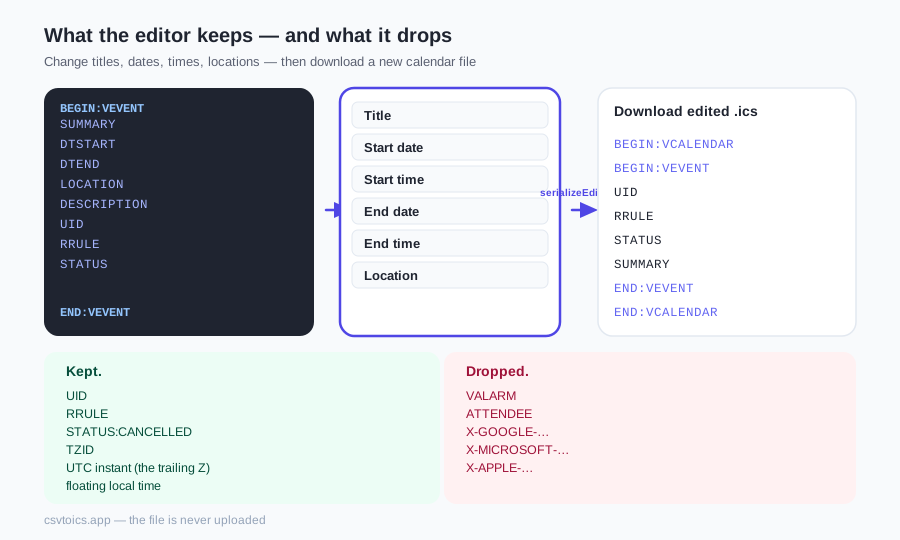
What the editor keeps — and what it drops
This is the honest inventory — the same keep/drop list scripts/test-ics-editor.mjs asserts. The editor is not a full iCalendar rewrite. It is a focused editor for the fields most people actually need to fix, and it refuses to invent values the parser did not keep.
Kept. UID, so re-importing the file can update the same event instead of creating a duplicate. Recurrence rules (RRULE), copied through unchanged — there is no RRULE editor, because a one-character mistake can silently change a weekly series into a daily one or drop the UNTIL date. The Repeats badge tells you the event still repeats; the rule itself is not rewritten. Cancelled status (STATUS:CANCELLED) stays cancelled, with the same badge the viewer uses. Timezone form is kept in one of three shapes: a named TZID, a UTC instant (the trailing Z), or a floating local time with no zone at all. You change the wall-clock numbers; you do not convert the event from New York to UTC.
Dropped. Alarms (VALARM) — reminder blocks are not reconstructed, because the parser never kept their trigger offsets in a form we could write back honestly. Attendee lists (ATTENDEE) and organizer mailboxes — the parser keeps a display name at most, not the full mailto and RSVP parameters, and writing a partial ATTENDEE line would be worse than omitting it. Custom X- properties (X-GOOGLE-…, X-MICROSOFT-…, X-APPLE-…) are not round-tripped either.
If you only need to read the file, including organizers and a clean view of cancelled updates, use the ICS viewer instead. It never writes a new file, so it never has to drop anything.
Common fixes
These are the jobs this editor is actually for — small, local changes to a file you already have, before you send it or import it.
- Wrong year on an export. A school calendar or a conference dump sometimes ships with last year's dates still in it. Open the file, fix the year on each event that is off, download, import.
- Fix a title before you send the invite file. You generated an .ics from a spreadsheet and noticed "Q2 planning" should have been "Q3 planning". Changing the file here is faster than re-running the whole conversion, and the original UIDs stay put.
- Delete the events you do not want from a large export. A 300-event team calendar dump is a blunt instrument when you only need the all-hands and the two off-sites. Mark the rest deleted, download a smaller file, import that.
- DST left a time one hour off. After a timezone or daylight-saving change, a handful of events can show the wrong wall-clock hour even though the TZID is still correct. Because this editor does not rewrite timezone form, you can nudge 09:00 to 10:00 (or the other way) and leave TZID=America/New_York exactly as it was.
- Clean up a duplicate file. Two exports merged, or someone imported the same dump twice and then exported again. Delete the extras here, keep the UIDs on the ones you want to remain canonical, and import the cleaned file.
Editor vs viewer vs converter — which one?
Three tools on this site share one ICS engine. They are not interchangeable; each one is honest about a different job.
- Edit the file — this page. Change titles, dates, times, locations and descriptions, or drop events, then download a new .ics. Use it when the calendar file is already close to right and you need a surgical fix.
- Only look — the ICS viewer. Events grouped by date, with recurrence and cancelled badges. No download, no dropped properties. Use it when you do not want to write a new file at all.
- Bulk-edit hundreds of rows — the ICS to CSV converter, then the CSV to ICS converter to come back. Sort, find-and-replace, delete fifty rows in a spreadsheet. That path mints new UIDs and does not preserve RRULE the way this editor does; it is the right tool for table-scale edits, not for a one-event title fix.
How to edit an ICS file online
Drop the .ics on the editor above. Change titles, dates, times and locations; drop events you do not want. RRULE and UID stay on the events you keep. Download the new file and import it. This is not a spreadsheet — hundreds of rows belong on ICS to CSV. To only look, use the ICS viewer. Nothing is uploaded.
ICS editor — frequently asked questions
How do I edit an ICS file online?
Drop the .ics file into the editor on this page. Each event becomes an editable card: title, start and end, all-day, location and description. Mark events you do not want as deleted. Download the edited .ics when you are done. Nothing is imported into your calendar until you open that downloaded file yourself.
Does this online ICS editor upload my file?
No. The file is parsed and rewritten entirely in your browser. It never leaves your device, is not stored on a server, and is not sent anywhere when you download. That is the same privacy model as the other tools on this site.
Can I change a repeating event's recurrence rule?
No. Recurrence rules (RRULE) are copied into the downloaded file unchanged. There is no editor for FREQ, BYDAY or UNTIL. A one-character mistake in a rule can silently turn a weekly series into a daily one or drop its end date, so this tool does not offer that control. The Repeats badge shows that the event still repeats. To rewrite a series, change it in the original calendar or rebuild the events from a spreadsheet.
What happens when I import the edited file into Google Calendar, Apple Calendar or Outlook?
The editor keeps each event's original UID. Calendar apps treat UID as identity, so importing the edited file may update the existing event with that UID instead of creating a duplicate. That is usually what you want when you are fixing a title or a date. If you needed a brand-new copy, you would need a new UID — this editor does not mint new UIDs for events that already had one.
Will the editor change the event's timezone?
No. Timed events keep their original timezone form: a named TZID stays a TZID, a UTC instant (the trailing Z) stays UTC, and a floating local time with no zone stays floating. You edit the wall-clock numbers you see. The editor does not convert 09:00 America/New_York into 13:00 UTC or the other way around.
How large an ICS file can I edit?
There is no upload limit because nothing is uploaded. A typical export of a few hundred or a few thousand events is fine. Tens of thousands of events will make the page sluggish, because every event is rendered as an editable card. For that size of job, convert the file to CSV, edit the table, and convert back.
Why are the alarms gone after I download?
The editor does not write VALARM blocks. Reminder offsets are not something the parser kept in a form we could reconstruct honestly, and writing a partial alarm is worse than omitting it. Attendee lists and custom X- properties are dropped for the same reason. If you only needed to read those fields, use the ICS viewer — it never writes a new file, so it never has to drop them.
How do I create new events from scratch instead of editing a file?
This editor does not add blank events. Put the events in a spreadsheet with Subject, Start Date and Start Time columns and run them through the CSV to ICS converter on the home page. That path is built for creating a calendar file, not for patching one you already have.