ICS to CSV Converter — Calendar File to Spreadsheet
Turn any iCalendar (.ics) export into a clean CSV you can open in Excel or Google Sheets. Drop the file below, preview the first 8 rows in a table, pick a timezone for UTC times, and download CSV, Excel (.xlsx) or JSON. 100% in your browser — nothing is uploaded.
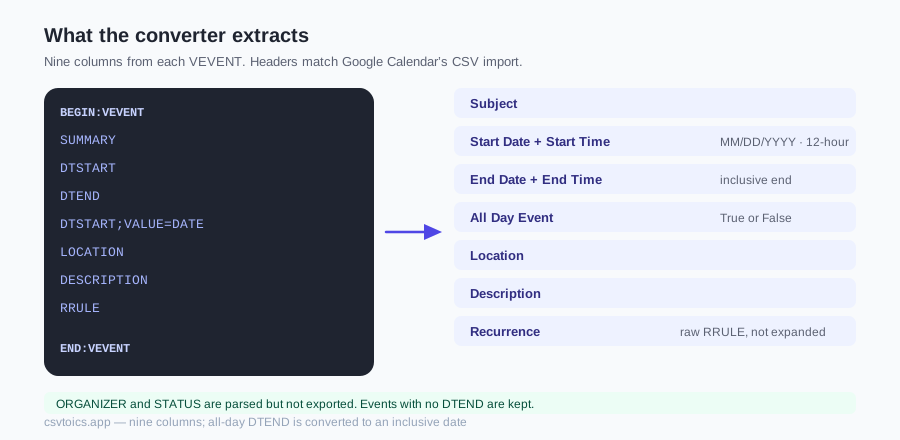
What the converter extracts
The parser is deliberately tolerant: it unfolds wrapped lines, accepts LF-only files, skips VALARM reminder blocks without letting them clobber event fields, and shrugs off vendor-specific properties (X-…) that other converters choke on. From each VEVENT the download writes nine columns: Subject, Start Date, Start Time, End Date, End Time, All Day Event, Location, Description and Recurrence. The parser also reads ORGANIZER and STATUS, but those are not exported. Text is unescaped (\n, \,, \;) back into normal characters.
Two details other tools commonly get wrong, handled here: all-day events use an exclusive end date in ICS, which the converter turns back into the inclusive end date a spreadsheet reader expects; and events without a DTEND (legal per the spec) are kept rather than dropped.
Common reasons to go ICS → CSV
- Reporting: count meetings per week, sum hours by project, or pivot events by location in a spreadsheet.
- Migration and cleanup: bulk-edit titles or locations in Sheets, then convert back with the CSV to ICS converter.
- Archiving: a CSV snapshot of an old calendar is searchable and future-proof.
- Sharing: colleagues without calendar access can read a spreadsheet.
Getting the .ics file out of your calendar first
Most people arrive here without an .ics file yet — the calendar is in an app, not on disk. These are the export paths from each vendor's own documentation. They move occasionally; if one is wrong, tell us and we'll correct it.
| Calendar | How to get an .ics out |
|---|---|
| Google Calendar (web) | Settings → Import & export → Export. You get a ZIP with one .ics per calendar — unzip it first. |
| Apple Calendar (macOS) | Select the calendar in the sidebar, then File → Export → Export. |
| Outlook on the web | There is no direct export. Settings → Calendar → Shared calendars → publish the calendar with “Can view all details”, then download the ICS link it gives you. Unpublish afterwards — anyone with that link can read the calendar. |
| Thunderbird | Right-click the calendar in the list → Export Calendar. |
One caution specific to the Outlook route: publishing is a sharing feature, not an export feature. The URL it produces is readable by anyone who has it, for as long as it stays published. Download your .ics, then go back into the same settings screen and unpublish.
The CSV columns you get back
Nine columns, in this order. They are deliberately the exact headers Google Calendar expects on import, so a CSV you edit in Sheets can go straight back into a calendar without renaming anything.
| Column | Comes from | Format |
|---|---|---|
| Subject | SUMMARY | Free text |
| Start Date | DTSTART | MM/DD/YYYY |
| Start Time | DTSTART | 12-hour with AM/PM; blank for all-day |
| End Date | DTEND | MM/DD/YYYY, inclusive |
| End Time | DTEND | 12-hour with AM/PM; blank for all-day |
| All Day Event | DTSTART;VALUE=DATE | True or False |
| Location | LOCATION | Free text, unescaped |
| Description | DESCRIPTION | Free text, unescaped |
| Recurrence | RRULE | Raw rule, e.g. FREQ=WEEKLY;BYDAY=MO |
The Recurrence column is where this tool differs from most converters, which drop the rule entirely. Keeping the raw RRULE means a weekly standup stays identifiable as a weekly standup in the spreadsheet. The Recurrence column is exported but not auto-mapped on import, so RRULE must be re-mapped by hand if you convert the CSV back to .ics. Delete it if you don't need it; nothing else depends on it.
How to convert ICS to CSV
Drop the .ics on the converter above. Each event becomes one spreadsheet row: title, start, end, location, description, and the raw RRULE when the event repeats. Download CSV and open it in Excel or Sheets. Nothing is uploaded. To go back to a calendar file, use the CSV to ICS converter. To only read the file, use the ICS viewer.
ICS to CSV — frequently asked questions
How do I convert an ICS file to CSV?
Drop your .ics file into the converter on this page (or paste the raw ICS text). It parses every event, previews the first 8 rows in a table, and downloads CSV, Excel (.xlsx) or JSON with Subject, Start Date, Start Time, End Date, End Time, All Day Event, Location, Description and Recurrence columns. Everything runs in your browser — the file is never uploaded.
How do I export my Google Calendar to ICS first?
In Google Calendar on the web, open Settings → Import & export → Export. You get a ZIP containing one .ics file per calendar. Unzip it and drop the calendar you want into the converter above. Individual calendars can also be exported from their own settings page under 'Integrate calendar'.
Will the CSV open properly in Excel?
Yes. The download is UTF-8 with a BOM, which is the encoding Excel needs to display accented characters and emoji correctly when you double-click the file. It also opens cleanly in Google Sheets, Numbers and LibreOffice.
How do I convert an ICS file to Excel?
Drop the .ics into the converter, switch the download format to Excel (.xlsx) and click Download. You get a workbook with the same nine columns as the CSV — dates and times as text cells, so Excel does not re-interpret them. CSV and JSON are the other two buttons.
Can I convert ICS to Excel?
Yes. This page writes CSV, Excel (.xlsx) and JSON — pick Excel (.xlsx) next to the download button. You do not need to Save As from Excel afterwards unless you want to change the sheet further.
What happens to recurring events?
Recurring events appear once, with their recurrence rule (e.g. FREQ=WEEKLY;BYDAY=MO) preserved in a Recurrence column so the information isn't lost. The converter does not expand a rule into hundreds of individual rows — for most spreadsheet analysis the single row plus rule is what you want.
How are timezones handled when converting ICS to CSV?
Events stored with a named timezone (TZID) keep their original wall-clock time, since that's what the organizer meant. Events stored as UTC ('Z' times) are converted to the display timezone you pick — it defaults to your browser's zone. All-day events have no time at all and are flagged True in the All Day Event column.
Can I re-import the CSV into Google Calendar later?
Yes — the column headers this tool writes (Subject, Start Date, Start Time…) are exactly the headers Google Calendar's CSV import expects, so the round trip works. Or skip CSV entirely and use our CSV to ICS converter to go back to an .ics file.