Recurring Event Generator — Build an .ics With an RRULE
This is the ICS creator form with the Repeats section open and Weekly preselected. Pick a frequency, an interval, weekdays (for weekly) and how the series ends, then download a standards-compliant .ics you can import into Google Calendar, Outlook or Apple Calendar. 100% in your browser — nothing is uploaded.
Repeats
Leave all unchecked to repeat on the event's own weekday.
Writes: RRULE:FREQ=WEEKLY — weekly
Give every event a title and a date to preview the generated file.
What the RRULE line means
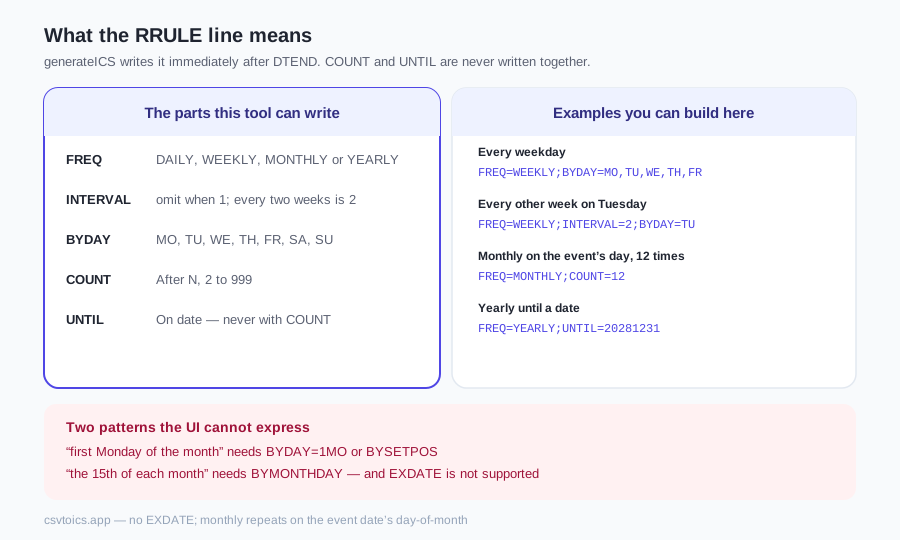
An ICS repeating event is still one VEVENT. The extra line that makes it a series is RRULE, defined in RFC 5545 §3.8.5.3. This form builds that line from the Repeats section; the same generateICS function that powers the CSV converter writes it immediately after DTEND.
The parts this tool can write, and the exact rules the code follows:
FREQ—DAILY,WEEKLY,MONTHLYorYEARLY. Required. Everything else is optional.INTERVAL— how many units to skip. Every two weeks isINTERVAL=2. When the interval is 1 the code omits this part (FREQ=WEEKLYalready means every week).BYDAY— weekday codesMO,TU,WE,TH,FR,SA,SU. Written only for weekly, and only when at least one weekday is checked, in Monday-to-Sunday order. Leave the boxes empty and the event repeats onDTSTART's own weekday —BYDAYis omitted.COUNT— stop after N occurrences. The form's After N radio, 2 to 999. While the field is empty no RRULE is written;buildRRuleitself also drops a COUNT of 1 or less.UNTIL— last date of the series. The form's On date radio.
COUNT and UNTIL are never written together; RFC 5545 forbids it, and the radio group makes that structurally impossible. UNTIL's value type must match DTSTART. All-day events use VALUE=DATE, so UNTIL is a DATE (YYYYMMDD). Timed events use a date-time, so UNTIL is UTC: 23:59:59 on the end date in the chosen timezone, converted to UTC (so the last day is included). When the timezone is UTC the code writes a plain …T235959Z on that same date.
The form opens with Weekly selected and no weekdays ticked, so the first download writes RRULE:FREQ=WEEKLY — it repeats on DTSTART's weekday with no end. Tick Monday and Wednesday and set Ends to After 10 occurrences and the line becomes RRULE:FREQ=WEEKLY;BYDAY=MO,WE;COUNT=10.
Examples you can build here — and two you cannot
These are the patterns the Repeats section can express. Each line is the exact RRULE body the form writes (all-day, interval 1, unless noted).
- Every weekday. Weekly, boxes Mon–Fri ticked:
FREQ=WEEKLY;BYDAY=MO,TU,WE,TH,FR. - Every other week on Tuesday. Weekly, Every 2, Tuesday ticked:
FREQ=WEEKLY;INTERVAL=2;BYDAY=TU. - Monthly on the event's day, 12 times. Monthly, Ends After 12:
FREQ=MONTHLY;COUNT=12. - Yearly until a date. Yearly, Ends On date 2028-12-31, all-day:
FREQ=YEARLY;UNTIL=20281231.
Two patterns the UI cannot express, honestly: “first Monday of the month” needs BYDAY=1MO or BYSETPOS, and “the 15th of each month regardless of start date” needs BYMONTHDAY. The form has no controls for those parts. A monthly rule here repeats on the same day-of-month as the event date. If you need positional rules, download the file and add them by hand — the how to create an ICS file guide lists the syntax, including BYMONTHDAY=1 and BYDAY=2TU.
UNTIL vs COUNT in Google Calendar, Outlook and Apple Calendar
Both COUNT and UNTILare standard RFC 5545 parts, and Google Calendar, Outlook and Apple Calendar all import both. Bound the same series either way — COUNT=N, or UNTIL on the date of the Nth occurrence — and the occurrences are identical; the difference is how you describe the last one, and how each app's event editor labels it afterwards.
- Google Calendarlabels them “Ends: On <date>” and “Ends: After N occurrences” in its event editor.
- Outlook's recurrence dialog calls them “End by” and “End after N occurrences”.
- Apple Calendar on iOSoffers only “End Repeat: Never / On Date” in its editor, so there is no “after N occurrences” label there for a
COUNT-bounded series; the rule itself is still valid RFC 5545.
Practical split: use On date when the series has a known last day (term ends, contract ends), After N when you know the number of sessions (ten standups, twelve rent reminders). Pick an end date on or after the event date — the form will not write an RRULE until that is true, because a series that ends before it starts is dropped the same way the CSV converter drops it.
The DTSTART-type rule for UNTIL is easy to get wrong by hand: a DATE-typed all-day event with a date-time UNTIL (or the reverse) is invalid under RFC 5545, and an importer is within the spec to reject it. The tool handles the typing so the import does not fail on a mismatched UNTIL. Timed events in a named zone also get a VTIMEZONE block: with UNTIL its transitions reach the UNTIL year (capped at five years past the start year); with COUNT or no end they reach one year past the start year.
Editing the series later
Once the file is on a calendar, you get that app's usual choice when you change one occurrence: this event, this and following, or all events. That dialogue is the calendar app's, not this site's — the .ics only described the series.
On this site the ICS editor keeps the RRULE line unchanged when you change a title, date or location and re-download. It shows a Repeats badge but has no controls to change the rule. To change the rule itself, rebuild the event here or edit the RRULE text by hand after download.
The ICS viewer shows a Repeats badge on events that carry an RRULE but does not expand occurrences. You see one card per VEVENT in the file, not one card per Monday for the next ten weeks. That is the same as the file: one event, plus a rule.
Exceptions (EXDATE) — not supported
RFC 5545 has EXDATEfor “this series, except these dates.” This generator writes RRULE only. There is no control to skip a date, so no EXDATE lines are written — there is no EXDATE handling in the library or the form components.
Two workarounds that are actually true: end the series before the gap (On date, or After N) and create a second event that starts after it; or import the file and delete the single occurrence in Google Calendar, Outlook or Apple Calendar. Coming back to this form and re-downloading will not carry that exception — you would get a clean series again.
If you already have a file with exceptions and just need to inspect it, the ICS viewer and ICS validator run in the browser too. The validator checks FREQ and that COUNT and UNTIL are not both present; it does not expand the series either.
The form on this page is free: each event you fill in already downloads with an RRULE for the frequency, weekdays, count or end date you set. Pro is the spreadsheet path — a Repeat cell (weekly, monthly, weekdays, or a FREQ= rule), plus Repeat Until or Repeat Count when the row has them, becomes that RRULE in the converter, so the row does not stay a one-off you retype here or patch by hand.
Recurring events + saved templates — a Repeat column (weekly, monthly, weekdays…) becomes a real RRULE in your .ics, and your column mapping is saved for one-click re-use. $7 one-time, no subscription — still 100% in your browser.
Recurring event generator — frequently asked questions
What is an RRULE in an ICS file?
RRULE is the RFC 5545 recurrence rule. This generator emits it as one line immediately after DTEND inside the VEVENT — for example RRULE:FREQ=WEEKLY;BYDAY=MO,WE;COUNT=10. Calendar apps expand that line into the individual occurrences. The line is built by buildRRuleFromForm from the Repeats section and passed through the same normalizeRawRRule guard as the CSV converter.
Can I make an event repeat only on certain weekdays?
Yes. Set Frequency to Weekly and tick the weekday boxes (Mon–Sun). The tool writes BYDAY= with those codes in Monday-to-Sunday order, so checking Wednesday then Monday still becomes BYDAY=MO,WE. Leave every box unchecked and BYDAY is omitted: the series repeats on the weekday of the event date (DTSTART) instead.
What is the difference between COUNT and UNTIL?
COUNT is a number of occurrences (the After N radio). UNTIL is a last date (the On date radio). RFC 5545 forbids both on the same rule; the radio group writes only one. COUNT is an integer from 2 to 999; while the After N field is empty no RRULE is written. UNTIL is a DATE (YYYYMMDD) for all-day events, or a UTC date-time for timed events — 23:59:59 on the end date in the chosen timezone, converted to UTC, so the last day is included.
Does the recurring event import into Google Calendar, Outlook and Apple Calendar?
Yes. The download is RFC 5545 iCalendar with a real RRULE; Google Calendar, Outlook and Apple Calendar all import FREQ, INTERVAL, BYDAY, COUNT and UNTIL. Timed events with a non-UTC timezone include a VTIMEZONE block; with UNTIL its transitions reach the UNTIL year (capped at 5 years past the start year), and for COUNT or never-ending rules they reach one year past the start year.
Can I skip one date in the series?
No. The generator writes RRULE only; there is no control to skip a date, so no EXDATE lines are written. Two workarounds that do work: end the series before the gap and create a second event after it, or delete the single occurrence in your calendar app after import.
Why does my monthly event not land on the first Monday?
This form has no controls for BYSETPOS, BYDAY-with-an-ordinal, or BYMONTHDAY. A monthly rule here repeats on the same day-of-month as the event date. “First Monday of the month” needs BYDAY=1MO or BYSETPOS, which the UI cannot express. Download the file and add those parts by hand if you need them.
Is anything uploaded when I generate the file?
No. The form never posts anywhere. The file is built in your browser tab and the download is saved locally. After the page has loaded you can go offline and still create the file. Nothing is stored on a server.