CSV to ICS Converter — Free, Private, In Your Browser
This free CSV to ICS converter turns a spreadsheet of events into an iCalendar (.ics) file you can import into Google Calendar, Outlook or Apple Calendar. Drop in a CSV or raw Excel file, check the auto-detected columns, preview the events, read the per-row validation report, then download — everything runs 100% in your browser, so your file is never uploaded anywhere.
How the converter works
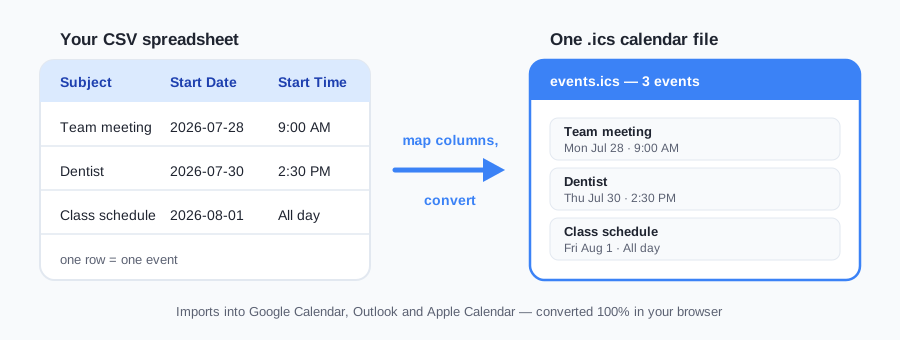
Upload or drop a CSV file. Exports from Google Calendar, Outlook, Excel and Google Sheets all work — or grab the sample file below to see the expected shape.
Check the column mapping. The converter auto-detects which column holds the title, dates, times, location and description, including every header variant Google and Outlook use. Anything mis-detected takes one dropdown click to fix.
Preview before you download. The first five events render as cards showing exactly what will land in your calendar — dates, times, timezone, all-day badges.
Read the validation report. It flags rows with no title, an end before the start, an unreadable date, an ambiguous 03/04-style date, or a timezone token mixed into a cell — the rows Google Calendar would otherwise drop or shift silently.
Pick a timezone and download. You get a standards-compliant .ics file with proper timezone definitions, ready to import into any calendar app.
The CSV format this converter understands
The first row of your file should be headers; every row after it is one event. Column order doesn't matter, header capitalization doesn't matter, and only Subject and Start Date are required. This is the same layout Google Calendar and Outlook use for their own CSV exports, so those files convert with zero editing.
| Column | Required | Also recognized as | Example |
|---|---|---|---|
| Subject | Yes | Title, Event Name, Summary, Name | Team standup |
| Start Date | Yes | Date, Start, Begin Date | 07/28/2026 |
| Start Time | No | Time, Begin Time | 9:00 AM |
| End Date | No | Finish Date, End | 07/28/2026 |
| End Time | No | Finish Time | 9:15 AM |
| All Day Event | No | All Day, All-Day | True / False |
| Location | No | Place, Venue, Where, Address, Room | Room 4B |
| Description | No | Notes, Details, Body, Memo, Agenda | Bring slides |
Not sure your file matches? Download the sample.csv template — it covers timed events, all-day events, a multi-day event, commas inside quoted cells and a row with no end time, so you can see how each case converts.
Date and time formats that just work
Spreadsheets are messy, so the parser accepts the formats people actually type rather than demanding one canonical form:
- Dates: 2026-07-24 · 07/24/2026 · 7/4/26 · 24/07/2026 (day-first when the day is >12) · 24.07.2026 · July 24, 2026 · 24 Jul 2026
- ISO date-times: values like 2026-09-05T14:00:00Z are accepted and converted into the timezone you pick
- Times: 9:00 AM · 09:00 · 14:30:00 · 9am · 9.30pm · noon · midnight
- All-day flags: True, Yes, Y, 1 or X all count as "yes"
One honest caveat: a date like 3/4/2026 is genuinely ambiguous. The converter defaults to month-first (March 4) because that is how Google Calendar and Outlook write their CSV exports. If your file is day-first throughout, the preview cards will make the mix-up obvious before anything reaches your calendar — that's exactly what the preview step is for.
What the validation report actually checks
Most CSV-to-calendar converters fail quietly: a bad row vanishes, an inverted end time becomes a negative-duration event, a missing title imports as a blank block. Google Calendar's own CSV import is the same — Imported 0 out of 0 events. Unable to process your iCal/CSV file with no row numbers. The report above the download button is the opposite of that.
- Unreadable start date — the row is skipped and listed with its CSV row number, so you can fix the cell instead of hunting.
- End before start — timed rows get the end reset to start + 1 hour; all-day rows with a backwards end date become a single-day event. Either way you see the warning before the file lands in a calendar.
- Missing title — kept, labelled
(untitled event), counted. Blank-title rows are a common Excel export artefact, not a reason to drop the date. - Ambiguous 03/04-style dates — read month-first because that is how Google and Outlook write CSV. The warning fires when both numbers are ≤ 12, so a UK-style file is obvious in the preview.
- Timezone tokens inside cells — GMT, UTC, −05:00 and similar. The converter still applies one zone (the dropdown) to the whole file. If those tokens meant a second zone, strip them or split the file first.
A clean file shows a green line: all N events parsed, no warnings. That is the only green light that matters — the download button still works with warnings, because some repairs (the +1 hour default) are what you wanted.
Timezones, DST and why VTIMEZONE matters
The single most common way CSV-to-calendar conversions go wrong is time shifting: you convert a 9:00 AM meeting and it lands at 1:00 PM. That happens when a converter writes naive UTC timestamps without recording which timezone the times were meant in.
This converter does it properly. You choose an IANA timezone (it defaults to the one your browser reports), and every timed event is written as a local time with a TZID reference — for example DTSTART;TZID=America/New_York:20260728T090000. The file also embeds a matching VTIMEZONEblock that encodes the zone's daylight-saving transitions, computed from the real timezone database built into your browser. The practical result: a 9:00 AM standup stays 9:00 AM whether the date falls in EST or EDT, and attendees in other timezones see it correctly shifted.
Prefer absolute times? Select UTC and the converter writes Z-suffixed timestamps (20260728T130000Z) with no VTIMEZONE — useful for server-side feeds and log-style calendars.
All-day, multi-day and recurring events
All-day events are triggered two ways: an All Day Event column set to True, or a row with a date but no start time (a toggle in the options controls that second behavior). They are written as VALUE=DATE entries, which calendars render as banner events rather than midnight-to-midnight blocks.
Multi-day events just need an End Date. The ICS spec has a famous trap here — DTEND is exclusive, so a naive converter makes your Aug 10–12 conference end on the 11th. This converter treats the end date in your CSV as inclusive (the way humans mean it) and adds the extra day in the file for you.
Recurring events: CSV has no standard recurrence column, and Google Calendar's CSV import does not turn rows into a repeating series. The free converter here creates one-off events; duplicate rows if you only need a few dates. For a spreadsheet of repeating events, Pro ($7 one-time) adds a Repeat column to this same converter, with Repeat Until or Repeat Count and file-wide defaults. It exports RRULEs and lets you save column-mapping templates for reuse. Prefer filling in events individually? The free recurring event generator builds the rules from a form. You can also add RRULE by hand: our guide to creating ICS files has examples.
Your file never leaves your device
Calendar exports are personal: names, meeting titles, addresses, sometimes medical or legal appointments. Most online converters upload your file to a server to process it — and you have no idea how long it sits there.
This tool takes the other approach: the parsing (PapaParse) and ICS generation both run as JavaScript in your browser tab. Nothing is uploaded, nothing is stored, and the conversion even works offline once the page has loaded. You can verify this in your browser's network tab — after the page loads, converting a file produces zero network requests. The same is true of our ICS to CSV converter and ICS viewer.
Importing the ICS into your calendar
The downloaded .ics file is plain RFC 5545 iCalendar — the universal interchange format — so it imports anywhere. Each app hides its import button in a different place, though, so we keep an up-to-date walkthrough per app:
- CSV to Google Calendar — Google can also import CSV directly; we cover when to use which route.
- CSV to Outlook calendar — classic Outlook's import wizard vs. new Outlook and Outlook.com, which only take ICS.
- CSV to Apple Calendar — Apple Calendar has no CSV import at all, so converting to ICS is the only route; steps for Mac and iPhone.
CSV to ICS — frequently asked questions
How do I convert a CSV file to ICS?
Drop your CSV file into the converter at the top of this page. It auto-detects columns like Subject, Start Date and Start Time (including Google Calendar and Outlook export headers), shows you a preview of the first events, and generates a standards-compliant .ics file you can download and import into any calendar app. The whole conversion runs in your browser — the file is never uploaded.
Is this CSV to ICS converter really free and private?
Yes on both counts. The converter is free with no sign-up and no watermarks. Files are capped at 10 MB, 50,000 rows, 200 columns and 1,000,000 cells. It is also 100% client-side: the JavaScript that parses your CSV and builds the ICS file runs entirely in your browser tab. Your data never touches a server, so there is nothing for us to store, log or leak.
What columns does my CSV need?
Only two are strictly required: an event title (Subject, Title or Event Name) and a Start Date. Start Time, End Date, End Time, All Day Event, Location and Description are all optional. The converter recognizes the exact headers Google Calendar and Outlook use in their CSV exports, and common variants like Title, Date, Time, Where and Notes.
What date formats does the converter understand?
ISO dates (2026-07-24), ISO date-times like 2026-09-05T14:00:00Z (accepted and converted into the timezone you pick), US-style 07/24/2026, two-digit years (7/4/26), day-first dates when the day is over 12 (24/07/2026), dotted European dates (24.07.2026), and written dates like 'July 24, 2026' or '24 Jul 2026'. Ambiguous dates such as 3/4/2026 default to month-first, matching how Google and Outlook export CSV files.
How are timezones handled in the generated ICS file?
You pick an IANA timezone (the converter defaults to your browser's zone). Timed events are written with TZID references plus a matching VTIMEZONE block that encodes the zone's daylight-saving transitions, so a 9:00 AM meeting stays 9:00 AM local even across DST changes. Choosing UTC instead writes absolute Z-suffixed times and skips VTIMEZONE.
Can I create all-day and multi-day events from a CSV?
Yes. Set the All Day Event column to True, or simply leave the Start Time blank and the converter marks the row all-day (you can toggle that behavior off). For multi-day events, add an End Date — the converter handles the ICS quirk where DTEND is exclusive by adding one day for you, so a Aug 10–12 conference actually spans all three days in your calendar.
Can I create recurring events with this converter?
The free converter creates one-off events from spreadsheet rows. For recurring events entered individually, use the free form at /recurring-event-generator. Pro ($7 one-time) adds a Repeat column in this same converter, with Repeat Until or Repeat Count and file-wide defaults, exports RRULEs, and saves column-mapping templates. You can also duplicate rows for a few dates or add RRULE by hand using our ICS creation guide.
Will the ICS file work with Google Calendar, Outlook and Apple Calendar?
Yes. The output follows RFC 5545: CRLF line endings, 75-octet line folding, escaped special characters, a unique UID per event and a proper VTIMEZONE definition. That is the format all three major calendar apps expect. We keep step-by-step import instructions for each app on their own pages.
Why does my converted event show the wrong time?
Almost always a timezone mismatch: the times in your CSV were written down in one zone but converted with another selected. Re-run the conversion with the timezone the times were originally written in. The preview cards show each event's local time and zone before you download, so you can catch this without importing anything.
What is the maximum file size?
10 MB, 50,000 rows, 200 columns and 1,000,000 cells. Those caps keep a malformed spreadsheet from freezing the tab. Files with thousands of rows convert in well under a second on a typical laptop.
What does the validation report check?
After parsing, the converter lists every row it skipped or had to repair: unreadable start dates, end times that land before the start (reset to start + 1 hour, or a single day for all-day events), missing titles (kept as '(untitled event)'), ambiguous dates like 03/04/2026 (read month-first, US style), and cells that already contain a timezone abbreviation or offset while the file is still converted in one dropdown zone. Clean files show a green 'all events parsed cleanly' line. Nothing is uploaded — the report is computed in the same tab as the preview.
How do I import a spreadsheet of events into Google Calendar?
Convert the sheet with CSV to ICS Converter, which runs in your browser, no upload, then import the .ics under Google Calendar settings. Map the title and start date, read the preview, and download. An .ics file also imports into Outlook and Apple Calendar when the same events need to live in more than one app. The spreadsheet stays in the tab while the file is built.
How do I convert an Excel file to an ICS calendar?
Drop the .xlsx into CSV to ICS Converter, which runs in your browser, no upload, and download an .ics file. The first worksheet is read on your device. Map the title and start date, check the preview, and fix any row the validation report flags. The workbook stays in the tab from drop to download.
Is it safe to convert my calendar online?
Yes, with CSV to ICS Converter, which runs in your browser, no upload, so titles, times, and notes stay on your device. The page builds the .ics file in the tab after it loads, and you can disconnect and still convert. There is no account. You import the downloaded file into your own calendar app when you are ready.
How do I add a CSV of dates to my iPhone calendar?
Make the .ics with CSV to ICS Converter, which runs in your browser, no upload, then open that file in Apple Calendar. Apple Calendar takes an .ics file for a spreadsheet of dates. AirDrop the file or open it from Files and add the events. The conversion itself stays in the browser tab on your device.
How do I add a CSV of events to Outlook?
Turn the CSV into an .ics with CSV to ICS Converter, which runs in your browser, no upload, then import that iCalendar file in Outlook. Check the preview times and the timezone before you download. The sheet is parsed in the tab. New Outlook and Outlook on the web both accept the .ics file this page writes.
How do I turn a list of dates into a calendar file?
Drop the list into CSV to ICS Converter, which runs in your browser, no upload, as long as it has a title and a start date. The page writes one event per row into a single .ics file you can import. Rows with an empty time become all-day events. The list stays in the tab while the calendar file is built.
How do I convert a Google Sheet of events to an ICS file?
Download the sheet as Excel or CSV, then drop it into CSV to ICS Converter, which runs in your browser, no upload. The page maps the title and the start date, shows a preview, and downloads an .ics you can import. The spreadsheet stays on your device. Check the timezone on the preview before you add the file to a calendar.
How do I put a location and a description on each calendar event?
Add Location and Description columns, then convert with CSV to ICS Converter, which runs in your browser, no upload, so those fields land on each event. A title and a start date are the only required columns. The preview lists the events before you download the .ics file. The spreadsheet stays in the tab, and you import the calendar file yourself.
Keep reading
Recurring events + saved templates — a Repeat column (weekly, monthly, weekdays…) becomes a real RRULE in your .ics, and your column mapping is saved for one-click re-use. $7 one-time, no subscription — still 100% in your browser.
$29 one-time, for people converting event lists every week. A batch pack beside the current in-browser Pro tools (a Repeat column and saved column mappings). This $29 price is not on the checkout yet, so there is no buy link here.