Google Calendar to ICS — Every Way to Get the File Out
Google Calendar will give you an .icsfile. It will not always give you the file you thought you asked for. As of 2026 — labels move — there are three real exits: export every calendar you own as a zip, export one calendar from that calendar's settings, or live with the fact that a single event has no Download ICS button. This page is the map of those exits, then what to do with the file once you have it.
The other direction — getting a spreadsheet into Google — is a different job: CSV to Google Calendar. Do not mix the two menus. Import and export share a settings screen; they are not the same action.
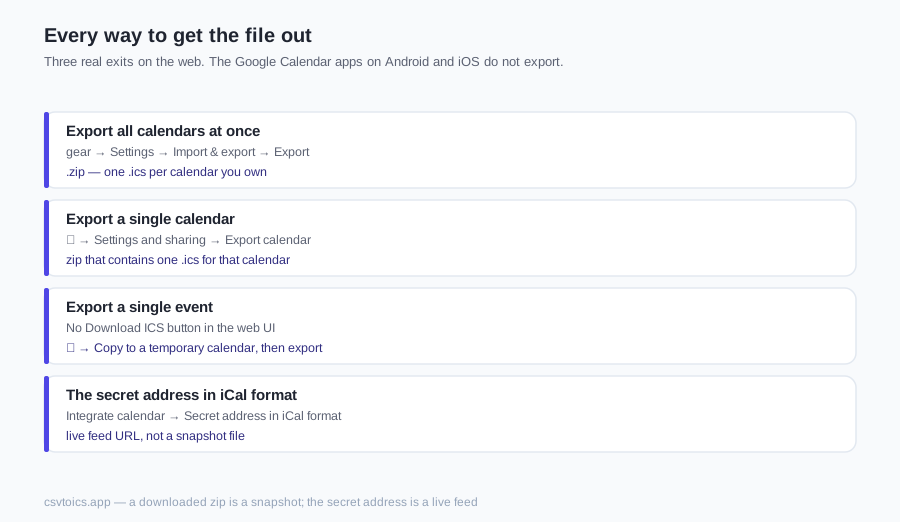
Export all calendars at once
As of 2026 — labels move: on the web, click the gear → Settings → Import & export → Export. Google downloads a .zip, not a single .ics. Unzip it. Inside is one .ics file per calendar you own, typically named after the calendar, each a complete VCALENDAR.
What is in the zip: your primary calendar, plus secondary calendars you created — Work, Personal, the kids' roster. What is not: subscribed calendars and holiday calendars. Those are feeds you follow, not calendars you own, and Google leaves them out. Shared calendars other people own are a grey area. If they sit under My calendars they sometimes come along; treat that as hedged, and do not rely on a shared calendar showing up.
The ICS viewer reads .ics files, not zip archives — unzip first, then drop in the calendar you actually wanted.
Export a single calendar
As of 2026 — labels move. Two doors lead to the same settings page: gear → Settings, then the calendar's name in the left column under Settings for my calendars; or, on the main calendar view, the ⋮ next to that calendar → Settings and sharing.
On that page Google documents an Export calendar control. It lives under the calendar's own settings, not under Integrate calendar. Integrate calendar is a different block further down the same long page — Calendar ID, public URL, secret iCal address. People mix the two because both are on one scroll: Export calendar writes a file; Integrate calendar hands you URLs.
Click Export calendar and you get a zip that contains one .ics for that calendar. Same unzip step, smaller archive. If you cannot see Export calendar, the labels have moved or you are looking at a calendar you do not own — scroll the whole page, then fall back to the all-calendars zip.
Export a single event
Honest version: as of 2026 — labels move — there is no per-event .ics download in the Google Calendar web UI. Open an event, open the ⋮ menu, and you will see Duplicate, Copy to, Publish event, Email guests — not Download ICS.
Publish event makes a public web page for that event. It is not an .ics file.
The .ics that does exist for a single event is the invitation attachment. When you add a guest and save, Google emails them an invite.ics. Emailing yourself is a clumsy but real way to get one event as a file. That attachment is a METHOD:REQUEST invitation, not a published calendar — some importers want PUBLISH instead.
The other honest workaround: create a temporary empty calendar, copy the event there (⋮ → Copy to), export that calendar, then delete the temporary one. You get a one-event .ics without involving guests.
The secret address in iCal format
As of 2026 — labels move: Settings → the calendar → Integrate calendar → Secret address in iCal format. That value is a live feed URL, usually an https://calendar.google.com/calendar/ical/…/basic.ics link, sometimes shown as webcal://. Fetching it returns current events. It is not a snapshot file sitting on disk.
How it differs from Export: export is a point-in-time copy. Change an event tomorrow and last night's .ics does not update. The secret address stays in sync for as long as the URL is valid — that is how other apps subscribe to a Google calendar.
Privacy warning: anyone who has the URL can read every event on that calendar, including details of events marked private. There is no Google login in front of it. Do not paste it into a ticket, a chat or a public gist. If it leaks, use the reset control next to it; the old URL dies and subscribers have to be given the new one.
On the phone
The Google Calendar apps on Android and iOS do not export. There is no Export button, no zip, no per-calendar download. As of 2026 that is still a desktop-web job.
Open calendar.google.com in the phone browser and request the desktop site (as of 2026 — labels move: Chrome ⋮ → Desktop site; Safari aA → Request Desktop Website), then follow the web paths above. Fiddly on a small screen, but it is the same UI. Easier: export on any computer. The file is yours to move by email or Drive. Tapping an .ics on the phone usually imports it; it does not export one.
What to do with the .ics
Once you have a real .ics — unzipped, not the secret URL — the file is ordinary iCalendar text. Nothing on this site uploads it.
- Open it without importing: the ICS viewer lists every event grouped by date.
- Turn it into a spreadsheet: ICS to CSV or ICS to Excel.
- Print it: ICS to PDF.
- Check it before sending it anywhere: the ICS validator.
- Move it into Outlook or Apple Calendar: import there. If the file refuses, ICS file not importing walks the usual causes — missing
VCALENDAR, bad dates,METHOD:REQUESTinvitations.
Spreadsheet back into Google: CSV to Google Calendar.
What's inside a Google export
A Google .icsis still RFC 5545, with Google's fingerprints on it. Open one in a text editor and you will see more than titles and dates.
VTIMEZONEblocks spelling out DST rules for the zones the events use, so a 9:00 AM stays 9:00 AM after import.X-GOOGLE-properties — conference links, display hints — plusX-WR-CALNAMEandX-WR-TIMEZONEon the calendar itself.RRULEon repeating events, withRECURRENCE-ID/EXDATEfor exceptions (the moved Tuesday, the cancelled fifth Monday).ATTENDEElines on meetings you organised or were invited to, next to anORGANIZER.
What this site's tools do with that, honestly: recurring events are shown once, not expanded into every occurrence. Attendees are not listed — the viewer reads ORGANIZER, not ATTENDEE. The extra X-GOOGLE- lines are ignored, which is fine; they are not what you need to open, convert or print the file. For the format itself, see what an ICS file is.
Google Calendar to ICS — FAQ
Does a Google Calendar export include past events?
Yes. As of 2026 the web export has no date-range picker, so the .ics holds every event still on that calendar — past, future and all-day. Deleted events are gone. Whether declined or hidden events appear has shifted in Google's help text; treat that as hedged. A ten-year calendar is a large file. That is expected, not a broken download.
Are shared calendars included in the export?
Calendars you own, including secondary ones you created, are in the all-calendars zip. Subscribed calendars and Google's holiday calendars are not — those are feeds you follow, not calendars you own. Calendars someone shared with you sometimes appear if they sit under My calendars and you have enough permission; Google's wording here has moved, so do not bet a migration on it. If you do not own the calendar, ask the owner to export, or subscribe via an iCal address they have shared.
How often should I re-export Google Calendar to ICS?
Whenever you need a current snapshot — before a migration, a quarterly backup, a printout. The downloaded .ics does not update itself. If you want a copy that stays current, that is the secret address in iCal format (a live feed URL), not the zip. Re-exporting the same calendar does not merge with the last file; it replaces it.
Can I automate a Google Calendar to ICS export?
Not from the Google Calendar web UI — there is no scheduled export. Three real options: fetch the secret iCal URL on a timer (anyone with that URL can read the calendar, so treat it as a password), use Google Takeout for an occasional bulk dump, or call the Calendar API if you are writing software. This site does not talk to your Google account and will not pull the file for you.
The Google Calendar export is too big. What now?
Unzip first — the all-calendars download is several .ics files stacked in a zip, and the viewer here does not unpack archives. Then export one calendar instead of all of them. A typical personal or team calendar is fine in the tools on this site; tens of thousands of events will make a page of cards sluggish. Google's export dialog still has no date-range filter as of 2026, so the honest split is one calendar at a time, not this year only.
How private is the secret address in iCal format?
Anyone who has the URL can read every event on that calendar, including details of events marked private. It is not a Google login. The long random token is the only lock. Do not paste it into a ticket, a chat or a public gist. If it leaks, reset it under Integrate calendar; the old URL dies and every subscriber has to be given the new one. A downloaded zip is a snapshot, not an open feed — a smaller disclosure, still not something to publish.
Does Google Calendar export ICS or CSV?
ICS. As of 2026, Settings → Import & export → Export writes a zip of .ics files. There is no Export as CSV in Google Calendar. To get a spreadsheet, export the .ics and run it through the ICS to CSV converter on this site. CSV is Google's import format, not its export format — getting a spreadsheet into Google is the other direction, covered on the CSV to Google Calendar page.