How to Create an ICS File
An ICS file is just structured text — you can write one in any text editor. Here's a working minimal template, the rules that actually matter, and the point at which you should stop hand-writing and use a converter instead.
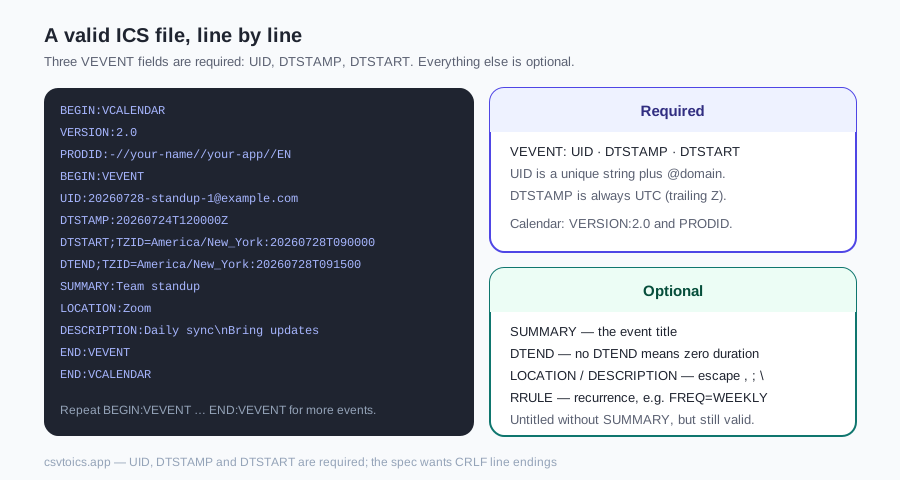
How to create an ICS file by hand
Copy this, change the values, save it as events.ics — it imports into every major calendar app:
BEGIN:VCALENDAR
VERSION:2.0
PRODID:-//your-name//your-app//EN
BEGIN:VEVENT
UID:20260728-standup-1@example.com
DTSTAMP:20260724T120000Z
DTSTART;TZID=America/New_York:20260728T090000
DTEND;TZID=America/New_York:20260728T091500
SUMMARY:Team standup
LOCATION:Zoom
DESCRIPTION:Daily sync\nBring updates
END:VEVENT
END:VCALENDAR
To hold more events, repeat the whole BEGIN:VEVENT … END:VEVENT block — one per event, each with its own unique UID — all inside the single VCALENDAR envelope.
The fields, line by line
| Line | Required | What it does |
|---|---|---|
| VERSION:2.0 | Yes | Declares the iCalendar spec version. Always exactly 2.0. |
| PRODID | Yes | Identifies the software that made the file. Any -//org//app//EN string. |
| UID | Yes | Globally unique event ID. Calendars use it to match updates to existing events — duplicated UIDs make events overwrite each other. |
| DTSTAMP | Yes | When this file was generated, always UTC (trailing Z). |
| DTSTART / DTEND | DTSTART yes | Start and end. With TZID=… for local times, trailing Z for UTC, or VALUE=DATE for all-day. No DTEND means zero duration (most apps render ~1 hour). |
| SUMMARY | No | The event title. |
| LOCATION / DESCRIPTION | No | Where, and free-form notes. Escape , ; \ and use \n for line breaks. |
| RRULE | No | Recurrence rule — see the examples below. |
Recurring events: RRULE recipes
Add one RRULE line inside the VEVENT. The pattern expands from DTSTART:
RRULE:FREQ=WEEKLY;BYDAY=MO,TU,WE,TH,FRRRULE:FREQ=WEEKLY;BYDAY=MO,WE,FR;COUNT=30RRULE:FREQ=MONTHLY;BYMONTHDAY=1RRULE:FREQ=MONTHLY;BYDAY=2TURRULE:FREQ=YEARLY;UNTIL=20281231T235959ZThis is the one thing spreadsheets can't express — CSV has no recurrence column — so the usual workflow is: generate single events from CSV with the converter, then paste an RRULE into the few events that repeat.
The rules that break hand-written files
- Escaping: inside text values, write commas as
\,semicolons as\;backslashes as\\and newlines as\n. - Line endings: the spec requires CRLF (\r\n). Most apps tolerate LF, but strict parsers exist — generated files should use CRLF.
- Line folding: lines longer than 75 bytes should wrap onto a next line that starts with a single space. Editors don't do this for you; it's the main reason long descriptions break hand-made files.
- Exclusive DTEND: all-day events end the day after the last day. Off-by-one imports are almost always this.
- Timezones: a bare TZID reference technically wants a matching VTIMEZONE block defining the zone's DST rules. Big apps substitute their own definitions, but embedding it (as our converter does) is what the spec asks for.
Once the file parses at all, run the finishing check below before any calendar sees it.
Validate what you wrote
A hand-written ICS can look fine in a text editor and still fail an import. Do this finishing pass before Google, Outlook or Apple Calendar ever sees the file:
Parse it. Drop the file into the ICS viewer — it reads tolerantly, shows every event as cards, and lists warnings that usually point at the broken line (missing DTSTART, unreadable dates, mismatched BEGIN/END). If the viewer cannot read it, neither will a calendar app.
Fix a field. If a title, date or location is wrong, open the same file in the ICS editor, change the field and download. It keeps each event's original UID (so a later import can update instead of duplicating) and copies RRULE through unchanged — it is not an RRULE editor.
Check the batch. For more than a handful of events, run the file through ICS to CSV and read the table. Wrong dates and swapped start/end jump out as rows, which is faster than scrolling cards.
Viewer, editor, table — then import. That order is the whole point of checking a file you wrote by hand. Start with the ICS viewer, patch fields in the ICS editor, and bulk-check through ICS to CSV.
Creating ICS files — FAQ
What is an ICS file exactly?
A plain-text file in the iCalendar format (RFC 5545) — the universal interchange format for calendar data. It wraps one or more VEVENT blocks inside a VCALENDAR envelope, each holding properties like SUMMARY, DTSTART and LOCATION. Google Calendar, Outlook and Apple Calendar all read and write it.
Can I create an ICS file in Notepad or TextEdit?
Yes — it's just text. Copy the minimal template on this page, edit the values, and save with an .ics extension (in TextEdit, use Format → Make Plain Text first). The spec formally requires CRLF line endings; most calendar apps forgive plain LF, but files from this site's converter use proper CRLF so they work everywhere.
Which fields are required in a VEVENT?
Three: UID (a globally unique ID — any unique string plus an @domain suffix works), DTSTAMP (when the file was created, in UTC), and DTSTART (when the event begins). Everything else — SUMMARY, DTEND, LOCATION, DESCRIPTION, RRULE — is technically optional, though an event without a SUMMARY shows up untitled.
How do I make an all-day event in ICS?
Use DATE values instead of date-times: DTSTART;VALUE=DATE:20260803 with DTEND;VALUE=DATE:20260804. Watch the trap — DTEND is exclusive, so a one-day event on Aug 3 ends on Aug 4, and a conference running Aug 10-12 needs DTEND of Aug 13.
How do I make a recurring event in ICS?
Add an RRULE line to the VEVENT. Examples: RRULE:FREQ=WEEKLY;BYDAY=MO,WE,FR for Mon/Wed/Fri; RRULE:FREQ=MONTHLY;BYMONTHDAY=1 for the 1st of each month; append COUNT=10 or UNTIL=20261231T000000Z to stop it. The recurrence expands from your DTSTART, so make sure the first occurrence matches the rule.
Why won't my hand-written ICS file import?
The usual suspects, in order: a missing or duplicated UID, special characters not escaped (commas, semicolons and backslashes must be written \, \; and \\, newlines as \n), a DTEND earlier than DTSTART, mismatched BEGIN/END pairs, or the file saved with rich-text formatting. Drop the file into our ICS viewer — it reads tolerantly and its warnings usually point straight at the broken line.
Is there a faster way than writing ICS by hand?
For more than a couple of events, yes: put them in a spreadsheet with Subject / Start Date / Start Time columns and run it through our CSV to ICS converter. It generates the UIDs, escaping, folding, CRLF endings and timezone definitions automatically, with a preview before download — and it all runs in your browser.