ICS Timezone — Why Your Event Shows at the Wrong Hour, and How to Fix It
An .ics event that lands three hours early is almost never a broken calendar app. The file encoded the start in one of three ways — UTC, a named TZID, or a floating local time — and the importer read a different one. This page is the map: the four DTSTART shapes, the DST mistakes, Windows vs IANA names, and what this site actually writes and checks.
Three ways an ICS stores a time
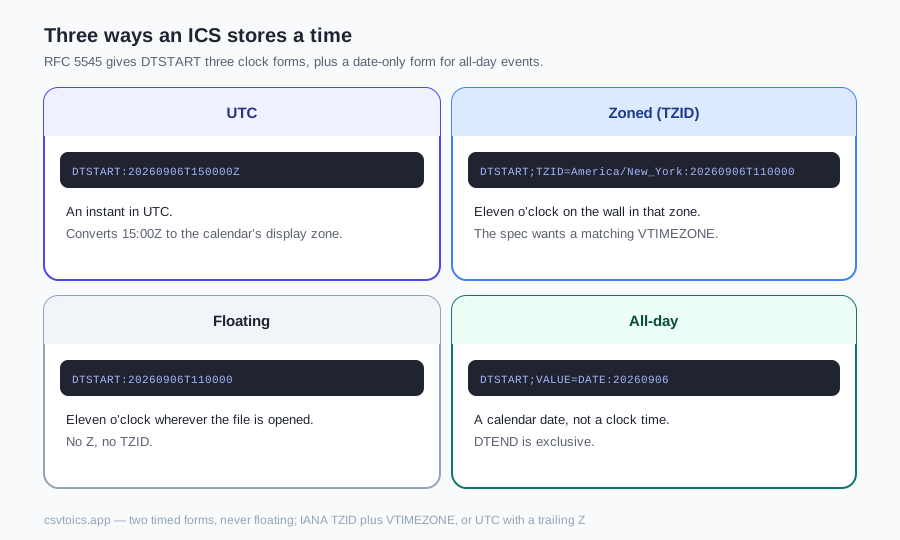
RFC 5545 gives DTSTART three clock forms, plus a date-only form for all-day events. The trailing characters are the whole contract. Apps do not “guess the timezone from the filename.”
| Form | Real line | What import does |
|---|---|---|
| UTC | DTSTART:20260906T150000Z | An instant in UTC. The app converts 15:00Z to the calendar’s display zone (11:00 in America/New_York in September). |
| Zoned (TZID) | DTSTART;TZID=America/New_York:20260906T110000 | Eleven o’clock on the wall in that zone. The spec wants a matching VTIMEZONE; many apps also resolve a known IANA name from their own database. |
| Floating | DTSTART:20260906T110000 | Eleven o’clock wherever the file is opened — no Z, no TZID. A meeting that should be 11:00 Eastern becomes 11:00 Tokyo for a colleague in Japan. |
| All-day | DTSTART;VALUE=DATE:20260906 | A calendar date, not a clock time. DTEND is exclusive: a one-day event on 6 September ends on 7 September. |
Mixing forms in one file is legal and common. A Google export often uses IANA TZID plus a VTIMEZONE. A hand-typed file often has a trailing Z on every timed event — or, worse, a floating time that the author thought was UTC.
Symptom → cause
Match the shift you see before you rewrite the file. The hour error is usually a signature of which form was misread.
- Off by your whole UTC offset (five hours in New York in winter, eight on the US West Coast, nine in Japan). A UTC instant (
Z) was displayed as local wall clock, or a local wall clock with noZwas treated as UTC. Open the file in a text editor and look at the last character ofDTSTART. - Off by one hour for part of the year. DST. The
VTIMEZONEis missing, its STANDARD/DAYLIGHT offsets are wrong, or two blocks declare the sameTZIDwith different bodies. Events in winter look fine; events after the spring-forward jump sit an hour early or late. - Shows at midnight, or spans two days. An all-day event was written as a timed
00:00, so the importer converts that midnight across the zone boundary. OrDTENDon aVALUE=DATEevent is not exclusive: a one-day event whose end date equals its start is zero-length; making the end the last visible day (without adding one) spills into the next morning. - "Unknown timezone" on import.
TZID=names a zone that is not defined in the file and that the app does not know — typically a Windows name such asEastern Standard Timewith no matchingVTIMEZONE, or a typo. The validator on this site warnsundefined-tzid-*for any referenced TZID that has noVTIMEZONE; it does not keep a list of “valid” names.
If the validator is clean and the hour is still wrong, the file is well-formed and the form is simply not the one you meant. Rebuild with an explicit IANA zone on the converter, or open the events in the ICS viewer.
IANA vs Windows timezone names
Two naming systems describe the same civil time. IANA (tz database) uses region/city: America/New_York, Europe/London, Asia/Tokyo. Windows uses display names: Eastern Standard Time, GMT Standard Time, Tokyo Standard Time. They are not interchangeable strings. Eastern Standard Time is also a poor name for a zone that observes daylight saving — the Windows id still covers EST and EDT.
As of 2026, the usual writers: Outlook (classic Windows and many Microsoft 365 exports) writes the Windows name as TZID and includes a VTIMEZONE that defines it. Google Calendar and Apple Calendar write IANA names. This site’s converter writes IANA names from the timezone dropdown (or UTC). It never emits a Windows TZID.
How importers cope is hedged, because none of the vendors publish a full TZID matrix. As of 2026: a well-known IANA TZID is often resolved even without a VTIMEZONE. A Windows name without a VTIMEZONE is the usual rejection or UTC fallback on Google and Apple. A Windows name with a matching VTIMEZONE often imports, because the app can apply the offsets in the file. If you control the file, use IANA.
What VTIMEZONE is
VTIMEZONE is a component inside VCALENDAR that defines one TZID: the standard offset, the daylight offset, and when the clock jumps. A typical export from Outlook or Google nests STANDARD and DAYLIGHT sub-components, each with TZOFFSETFROM, TZOFFSETTO, a local DTSTART for the first occurrence, and often an RRULE such as FREQ=YEARLY;BYMONTH=3;BYDAY=2SU (second Sunday in March).
It is required by the spec whenever a DTSTART or DTEND uses TZID=. UTC times (Z), floating times, and all-day VALUE=DATE events do not need one. Without it, apps that already know the IANA name usually still place the event; apps that do not know the name — or that refuse to guess — fall back to UTC or show “unknown timezone.” That is the fallback the validator documents on undefined-tzid-*.
Two VTIMEZONE blocks with the same TZID and different bodies are worse than a missing one: the importer may pick either definition. The validator treats that as an error (tz-conflict-*). An identical repeat is only a warning (tz-dup-*).
How this converter handles timezones
The home-page converter has a dropdown labelled Timezone for event times. It lists IANA names from the browser (Intl.supportedValuesOf("timeZone")) plus an explicit UTC option, and defaults to your browser zone. That value is the single zone for the whole file.
What gets written depends on that choice:
- UTC (or empty): timed events are
DTSTART:YYYYMMDDTHHMMSSZ/ matchingDTENDwith a trailingZ. NoVTIMEZONE, noX-WR-TIMEZONE. The converter does not write floating timed events. - A named IANA zone:
DTSTART;TZID=America/New_York:YYYYMMDDTHHMMSS(the wall-clock numbers from the spreadsheet),X-WR-TIMEZONE:America/New_York, and — if the file has any timed events — aVTIMEZONEwhoseTZIDis that IANA name. The block is built from observed offset transitions in the event years (STANDARD or DAYLIGHT per jump, withTZOFFSETFROM/TZOFFSETTO). It does not emit anRRULEinsideVTIMEZONE. All-day-only files still getX-WR-TIMEZONEbut skip the block, because date values carry no TZID. - All-day: a row with no start time is treated as all-day when “Treat rows without a start time as all-day events” is on (the default). An All Day column of true / yes / y / 1 / x also marks the row. Those events are
DTSTART;VALUE=DATE:YYYYMMDDandDTEND;VALUE=DATE:of the inclusive end plus one day. Timed rows with no start time and detection off default to 09:00.
ISO date-times in a cell are not passed through as-is. A naive string such as 2026-09-05T14:00 (no offset) is kept as 14:00 wall clock, then tagged with the selected zone. A string with Z or a numeric offset (2026-09-05T09:00:00Z, 2026-09-05T14:00:00+01:00) is converted to wall clock in the selected zone first, then written as that zone’s TZID — or as Z if the dropdown is UTC. The original offset never appears in the .ics. Example from the converter tests: 2026-09-05T09:00:00Z with Europe/London selected becomes DTSTART;TZID=Europe/London:20260905T100000 (09:00Z is 10:00 BST).
One dropdown cannot honour two zones in the same spreadsheet. If cells still contain GMT, EST, or a −05:00 token, the converter warns and still applies the selected zone. Strip those tokens or split the file first.
Check and fix a file
Four tools on this site, each with a narrow job:
- ICS validator: lint, not a certification. Timezone rules are exactly
undefined-tzid-*(warning: TZID referenced, no matching VTIMEZONE),tz-conflict-*(error: same TZID, different VTIMEZONE bodies), andtz-dup-*(warning: identical VTIMEZONE repeated). There is no “unknown IANA name” check — Windows names and typos are the undefined-TZID warning unless a VTIMEZONE defines them. - ICS editor: titles, dates, times, location, description, all-day toggle, delete. It does not change timezone. The hint on each card is “TZID=… — kept as-is”, “UTC (Z) — kept as-is”, or “Floating local time — kept as-is.” On download it rebuilds a
VTIMEZONEfor IANA TZIDs; an invalid TZID is left on the event and the VTIMEZONE is skipped. - ICS viewer: read the agenda without importing. UTC (
Z) times are shown in your browser timezone; TZID and floating times keep the wall clock in the file. The header says “UTC times shown in …”. - Rebuild from CSV on the home page when the zone is wrong in the file itself. Pick the IANA zone (or UTC) and download a new .ics with the DTSTART forms above.
If the file will not import at all, start with ICS file not importing — unknown TZID is one of the twelve causes there. For the format itself, what an ICS file is.
Per-app notes
Menu names and importer quirks move. The notes below are as of 2026, not a vendor guarantee.
- Google Calendar:Settings → Import & export → Import. IANA
TZIDvalues are usually resolved. Windows names without aVTIMEZONEare the usual miss. Floating times tend to display as the calendar’s zone, which is easy to misread as “Google converted it.” - Outlook: classic Windows still writes Windows TZIDs plus a
VTIMEZONE. It generally reads IANA names. New Outlook and Outlook on the web do not share every import path with classic — if File → Open & Export is missing, open the attachment instead. - Apple Calendar: IANA in, IANA out on recent macOS/iOS. File → Import, or drop onto a calendar you own (not a subscription). Floating times display in the Mac’s zone. A UTC
Zis converted like any other instant.
Floating time is the least portable of the three clock forms. If two people in different zones must see the same instant, write UTC or a named TZID — not a bare DTSTART:20260906T110000. This converter never emits that floating form for timed events.
ICS timezone — frequently asked questions
Why is my ICS event showing at the wrong hour?
The file stored the time in one of three forms — a UTC instant (trailing Z), a named TZID, or a floating local time with neither — and the calendar app interpreted a different form than the writer meant. Off by your whole UTC offset usually means Z was read as local, or a local wall clock was treated as UTC. Off by one hour for part of the year is almost always DST: the VTIMEZONE block is missing, outdated, or conflicts with another definition of the same TZID.
What are the three ways DTSTART stores a time in an ICS file?
UTC: DTSTART:20260906T150000Z — an instant; apps convert it to the calendar's display zone. Zoned: DTSTART;TZID=America/New_York:20260906T110000 — a wall clock in that zone; the spec wants a matching VTIMEZONE. Floating: DTSTART:20260906T110000 — 11:00 wherever the file is opened. All-day is a fourth shape, not a clock time: DTSTART;VALUE=DATE:20260906, with an exclusive DTEND.
Does this converter write UTC, TZID, or floating times?
Two timed forms, never floating. With Timezone set to UTC it writes DTSTART:YYYYMMDDTHHMMSSZ and skips VTIMEZONE. With an IANA zone such as America/New_York it writes DTSTART;TZID=America/New_York:YYYYMMDDTHHMMSS, X-WR-TIMEZONE, and a VTIMEZONE built from observed DST transitions (STANDARD/DAYLIGHT with offsets — no RRULE). All-day rows are DTSTART;VALUE=DATE and an exclusive DTEND;VALUE=DATE. Covered by scripts/test-ics.mjs.
What timezone rules does the ICS validator check?
Three TZID checks, not a list of valid zone names. undefined-tzid-* is a warning when a DTSTART or DTEND TZID has no matching VTIMEZONE in the file. tz-conflict-* is an error when two VTIMEZONE blocks share a TZID but their contents differ. tz-dup-* is a warning when the same VTIMEZONE body is repeated. The validator does not classify IANA vs Windows names; a Windows TZID with no VTIMEZONE is the same undefined-tzid warning.
Can the ICS editor change an event's timezone?
No. Each timed event keeps the form it arrived with: a named TZID stays that TZID, a UTC instant (trailing Z) stays UTC, and a floating local time stays floating. You edit the wall-clock numbers. For IANA TZIDs the download rebuilds a matching VTIMEZONE; a TZID that is not a valid IANA name is kept on the event but the VTIMEZONE is skipped rather than aborting the file.
In which timezone does the ICS viewer display times?
UTC instants (the trailing Z) are converted to your browser's timezone — the page labels this as “UTC times shown in {zone}”. TZID and floating times keep the wall-clock numbers written in the file; they are not converted to the browser zone. All-day VALUE=DATE events stay dates.
Should I use IANA or Windows timezone names in an ICS file?
IANA, if you control the file: America/New_York, Europe/London, Asia/Tokyo. Outlook commonly writes Windows names such as Eastern Standard Time together with a VTIMEZONE that defines them. Google Calendar and Apple Calendar typically write IANA names. As of 2026, importers that know the IANA name often still place the event without a VTIMEZONE; a Windows name with no VTIMEZONE is the usual “unknown timezone” failure. Rebuild from CSV with this converter to get IANA TZIDs.